Generate LinkedIn headlines in seconds: customized to your role, tone, and goals. Built for clarity and visibility. No sign-up. Just smart, fast suggestions that work.
I am a...
Thank you! Your submission has been received!
Oops! Something went wrong while submitting the form.
Helpful tips
▼
To improve results, we suggest including a bit more information than just your title and company. For example, consider specifying what your company does, who it targets, or what kind of content you like to share on LinkedIn.
For example:
Co-founder of Taplio, a tool to help you build a personal brand on LinkedIn
Head of marketing at Lempire, and I share copywriting tips
I run ABC, an online community focused on Web3 and FinTech
When I first tested the tool, I expected something generic. But the process turned out to be surprisingly intuitive, and kind of fun. Follow the next steps and you will see exactly how I use it every time I help someone update their LinkedIn profile.
{{headline-generator-card}}
Why LinkedIn headlines matter more than your entire profile
The first time I wrote my headline, I thought the rest of my profile would do the heavy lifting. I was wrong. No one even got that far.
Your headline is what people actually see when they don’t know you. It’s your one line to make them care and trust.
LinkedIn has more than 950 million users. Therefore, if your headline does not cut through, you’re invisible. And since you only get 220 characters on the desktop and 240 on mobile, you need to write something that matters right away.
Here’s what people are scanning for:
What you do
Who you help
Why it matters
And they decide fast. LinkedIn’s State of Sales report says 46% of buyers lose interest if a profile feels unprofessional or unhelpful.
I’ve seen it firsthand. I’ve helped people update nothing but their headline and suddenly they started getting views, replies, interview requests, and many more opportunities.
Let’s start generating the perfect headline for you!
{{sign-up-btn}}
Our headline proven formulas and best practices for LinkedIn headlines
Whenever I feel stuck writing a headline, I go back to three formulas which are simple to follow, but it works well.
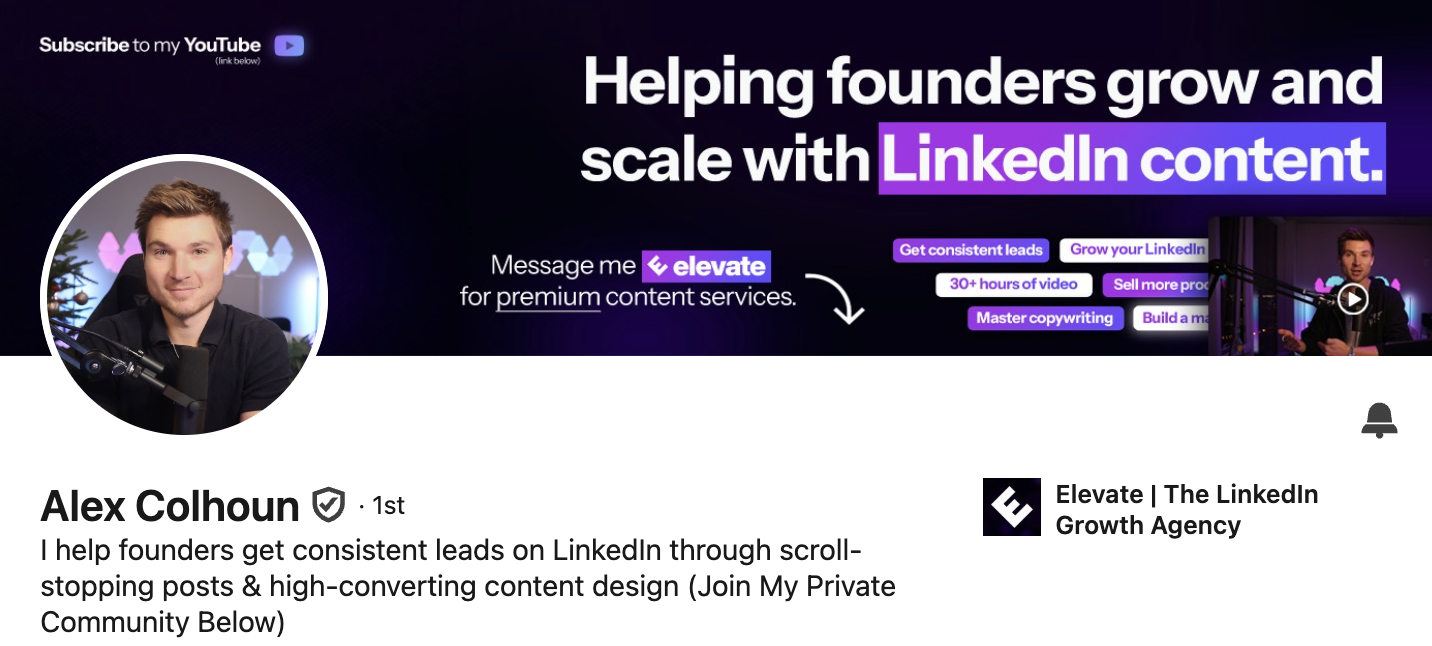
The value proposition
“I help [audience] achieve [result]”
Example: I help B2B startups generate inbound leads with SEO-focused content.
This one’s great when you want to be clear, not clever.
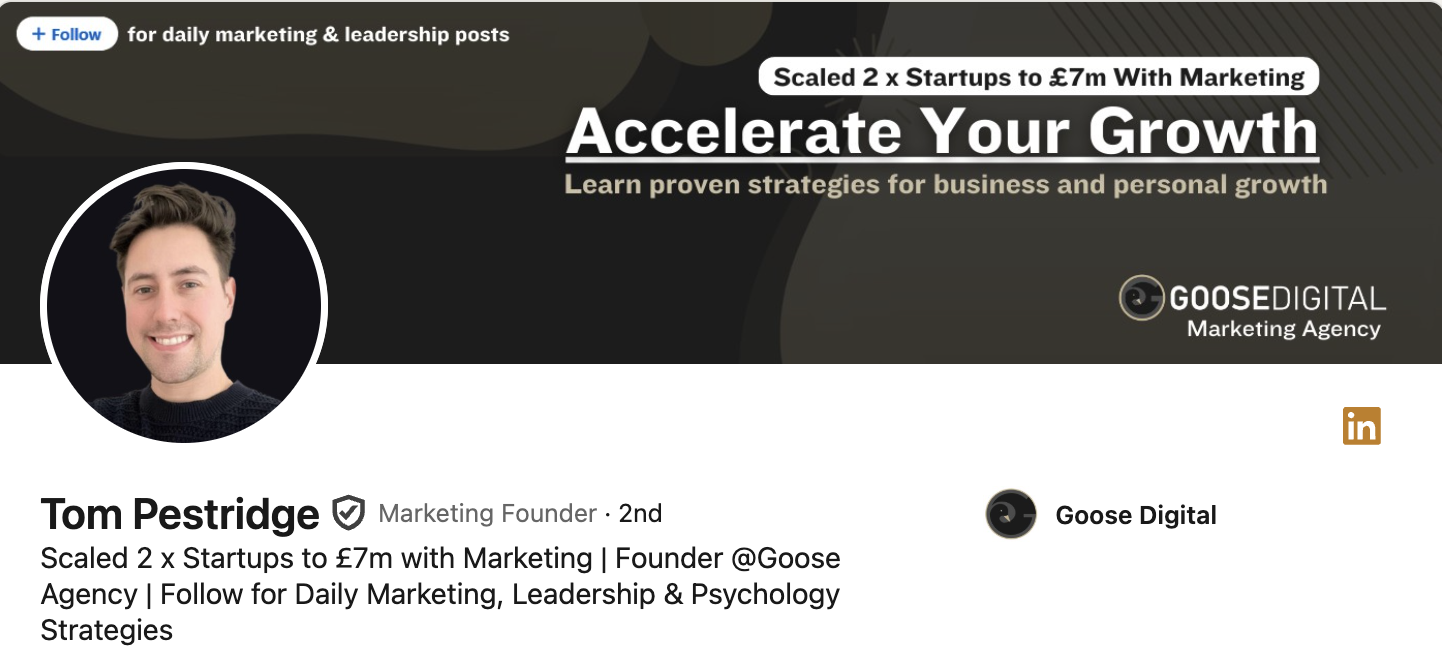
The metrics-first format
“Title | Result | Context”
Example: Sales Director | Closed $12M in 2023 | Leading outbound for SaaS
This works best when you want to show credibility without overselling.
Problem → solution
“Struggling with [problem]? I [solve it].”
Example: Hiring SDRs remotely? I help startups ramp reps 2x faster.
This is the one I use most for freelancers and consultants.
I usually generate a few options with the headline tool, then add some changes to them using these formats. Sometimes I even combine two in one line.
Want headline ideas that actually generate clicks? Use the Viral Post Generator to see what your audience engages with – then match your headline to your post tone.
Stop using “passionate” and 4 other headline killers
I have seen this a lot of times, someone writes “Passionate Marketing Professional” and wonders why no one’s clicking their profile. Because everyone is passionate about their job. It’s actually a normal thing to be.
Here are a few phrases to avoid completely:
“Passionate about…” – sounds generic and filler
“Experienced in…” – says how long, but not how good
“Team player” – doesn’t separate you from anyone else
“Hard-working” – good, but expected
“Motivated professional” – no one’s searching for that
Buzzwords like these take up space you could use to say something real.
Another common mistake? Writing a headline that’s too long. If it gets cut off on mobile (over 240 characters), it’s wasted. I always keep mine under 200 to be safe. Taplio’s character limit checker helps with that.
I also see industry clichés. In tech, everyone’s a “problem-solver.” In sales, everyone “drives revenue.” Try being specific instead.
Before: “Results-oriented Product Manager passionate about innovation” After: “Product Manager | Built 5 SaaS features used by 500K+ users”
20 LinkedIn headline examples that get results
I have collected these from profiles I have helped rewrite and accounts I follow. They are from people I have seen land interviews and clients and even those invited for speaking.
Marketing
Fractional CMO | Scaled 3 startups to $2M+ ARR
I help B2B SaaS grow with organic content that converts
CEO @ Your Company – Marketing & Growth (list of clients here…)
Sales
SDR Coach | 50+ meetings/month | Training outbound reps that convert
Sales Director | Closed $18M in ARR | Leading fully remote teams
CEO | Sales Consulting & IA | Helping sales teams | 25 + Years Sales & Marketing Experience
Tech / Product
CTO @ HealthStack | Leading remote teams across 4 time zones
Full Stack Dev | React, Node, AI | 15+ products shipped
Ex-nurse turned UX Designer | Building healthtech tools that work
Freelancer & Coach | Helping creatives grow through content
Career change / Personal brand
Ex-nurse turned UX Designer | Building healthtech tools that work
Freelancer & Coach | Helping creatives grow through content
I have gathered both types of headlines that feel polished but also casual. Choose the tone that fits your audience.
If you want to try Taplio’s headline generator or any other feature, sign up here!
{{sign-up-btn}}
FAQ
What is the character limit for LinkedIn headlines?
LinkedIn allows up to 220 characters on desktop and about 240 on mobile.
To ensure consistency across devices, aim for 180–200 characters. It keeps your headline clean, visible, and readable on both screens. If it gets cut off mid-sentence, you risk losing attention. I always preview it on mobile before hitting save.
How long should a LinkedIn headline be for maximum impact?
The sweet spot is 150–200 characters.
This range gives you enough room to show value without overwhelming the reader. Keep it concise but powerful: state your role, value, and maybe a number or keyword. “Helping eCom brands scale with TikTok Ads | +450% ROAS avg” fits beautifully in this window.
What's the difference between a LinkedIn headline and an executive summary?
The headline is your 1-line hook; the summary is your full elevator pitch.
Think of the headline as your attention-grabber—it follows you across the platform. The summary, on the other hand, gives you space to tell your story. They should align in message but differ in format.
How do I write a professional LinkedIn headline for executives?
Focus on outcomes, leadership scope, and scale.
Instead of “CEO at SolarTech,” write: “CEO @ SolarTech | $40M ARR | Helping hotels cut energy use by 30%.” Use this space to showcase authority, growth, and mission.
What should I put in my LinkedIn headline as a CEO?
Highlight your company, impact, and who you serve.
A good example: “Founder @ Finlytics | Building AI tools for SMB finance teams | $12M raised.” It tells the reader who you are, what you do, and how big you play.
How often should I update my LinkedIn headline?
Every time your focus or goals shift.
Your headline isn’t static. If you change roles, launch something new, or start job hunting, update it to reflect that. I revisit mine quarterly—it’s a tiny tweak with a big payoff.
How do I optimize my input to get better headlines?
Be specific. Avoid vague titles like “Consultant” or “Engineer.”
Add your niche, audience, or expertise. For example, instead of “Marketing Consultant,” write “Email Marketing Consultant for SaaS | $2M+ ARR driven in 2023.” The tool works better when your input gives it more to work with.
Use our full suite of LinkedIn tools to write, optimize, and grow your presence with ease.
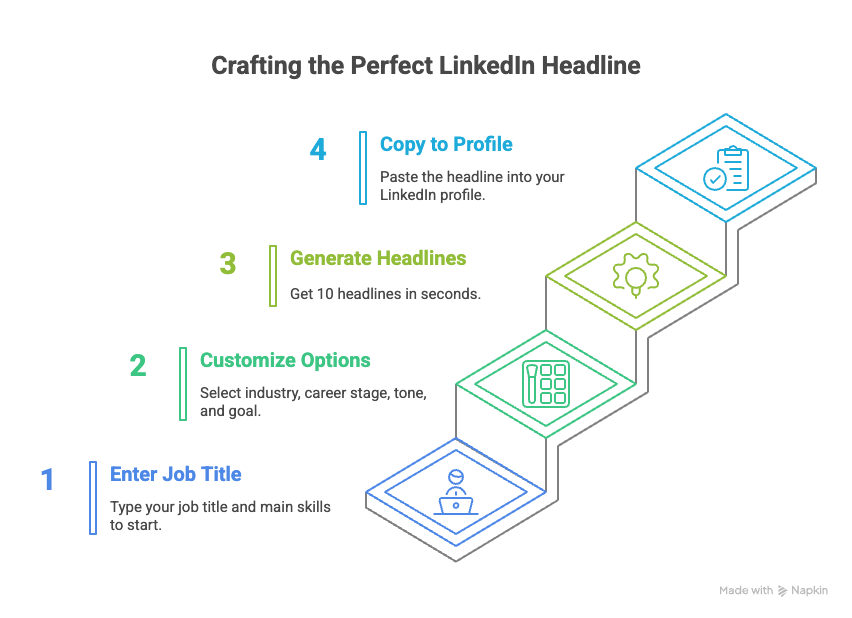
1
Type your job title and main skills
Keep it short and clear. For example: “Marketing Manager | B2B SaaS | Content Strategy.”
The first time I tried, I just wrote “Marketing Manager” and got boring results. When I added a few keywords, the tool started giving me headlines that actually sounded like me.
2
Choose your customization options
Select your industry, career stage, tone, and headline goal (e.g. job search, networking).
I usually go with “Marketing,” “Mid-career,” and “Results-driven.” But when helping a friend in a career switch, we picked “Creative” and “Career change”, and the tone shifted completely.
3
Click “Generate” to get 10 headlines instantly
The tool gives you 10 headlines in under 3 seconds. All are under 220 characters and ready to copy.
I like to combine parts of two or three headlines when none feel perfect. It takes seconds and feels like I wrote it myself.
4
Copy and paste into your LinkedIn profile
Click the pencil icon on your profile and paste the new headline under your name.
I always check how it looks on mobile. A headline that’s too long might get cut off.






.png)