
Pricing


"Best LinkedIn MCP Server in 2026: Honest Comparison"

June 18, 2026

8
min read

 Open in ChatGPT
 Open in Claude
 Open in Perplexity

Key Takeaways
- There is no single best LinkedIn MCP server: the right pick depends on the job, since content tools and data scrapers do fundamentally different things.
- For creating your own content, the Taplio LinkedIn MCP wins: it is official, no-code, runs on your own Taplio account with no scraping, and exposes 14 tools covering drafting, scheduling, publishing, and analytics.
- Add it in one step: run "claude mcp add --transport http taplio https://mcp.taplio.com", or paste https://mcp.taplio.com as a custom connector in Claude or ChatGPT settings, then authenticate.
- Open-source scrapers suit raw data extraction: stickerdaniel/linkedin-mcp-server and adhikasp/mcp-linkedin pull profiles, companies, jobs, and feeds for free, but require Docker or CLI setup and carry an account-ban risk.
- Third-party platforms cover automation and scale: Composio and Zapier handle managed LinkedIn actions in agent workflows, while Bright Data and Apify are built for large-scale data extraction billed by usage.
Short answer: there is no single best LinkedIn MCP server, because they do different jobs. If you want to draft, schedule, publish, and analyze your own LinkedIn posts from inside an AI assistant, the Taplio LinkedIn MCP is the best pick. It is official, no-code, and runs on your own Taplio account with no scraping. If you instead need to pull raw data out of LinkedIn (profiles, companies, job listings), an open-source scraper or a data platform will serve you better, with the tradeoff of setup work and account-ban risk.
Here is how the real options stack up so you can pick fast.

Comparison table
| MCP option | Best for | Official | No-code setup | Account-safe | Cost |
|---|---|---|---|---|---|
| Taplio LinkedIn MCP | Creating your own content (draft, schedule, publish, analyze) | Yes | Yes | Yes (your own account, no scraping) | Taplio subscription |
| stickerdaniel/linkedin-mcp-server | Scraping profiles, companies, jobs, inbox | No | No (Docker/uvx) | Risk of ban (browser automation) | Free / open-source |
| adhikasp/mcp-linkedin | Reading your feed, searching jobs | No | No (CLI + login) | Risk of ban (unofficial API) | Free / open-source |
| Composio LinkedIn MCP | Managed LinkedIn actions in agent workflows | No (third-party) | Mostly | Depends on connection | Composio platform plan |
| Zapier LinkedIn MCP | No-code automation across apps | No (third-party) | Yes | Uses official Zapier connection | Zapier plan |
| Bright Data / Apify | Large-scale LinkedIn data extraction | No (third-party) | Partial | Built for scraping at scale | Usage-based |
Taplio LinkedIn MCP: best for content
This is the official Taplio server (taplio-public-mcp at mcp.taplio.com). You add it with one command, claude mcp add --transport http taplio https://mcp.taplio.com, and it authenticates with your Taplio account on the first call. No API keys to juggle, no browser to babysit. Prefer no terminal? Add it as a custom connector instead: in Claude (Pro, Max, Team, Enterprise) or ChatGPT, open Settings, go to Connectors, click Add custom connector, paste https://mcp.taplio.com, and authenticate.

It runs on your own Taplio account, so there is no scraping and no browser automation. That is the part that matters for account safety. It exposes 14 tools that cover the full content loop: find inspiration, create and edit drafts, schedule, publish, unschedule, delete, and read your post and account analytics. Nothing goes live without your explicit confirmation, so the AI cannot surprise-post on your behalf.
It works with Claude (Desktop and Code), Cursor, ChatGPT, VS Code, Windsurf, and Zed. See the connect-to-Claude guide for the exact steps.
One honest limit: it is text-only. You can draft and schedule the copy, but you cannot upload images, video, or PDF carousels through the MCP yet.
Pick this if your goal is to write and ship LinkedIn posts faster, build a scheduling workflow, or analyze your post performance without leaving your editor. It pairs naturally with creating LinkedIn posts with AI.
stickerdaniel/linkedin-mcp-server: best open-source scraper
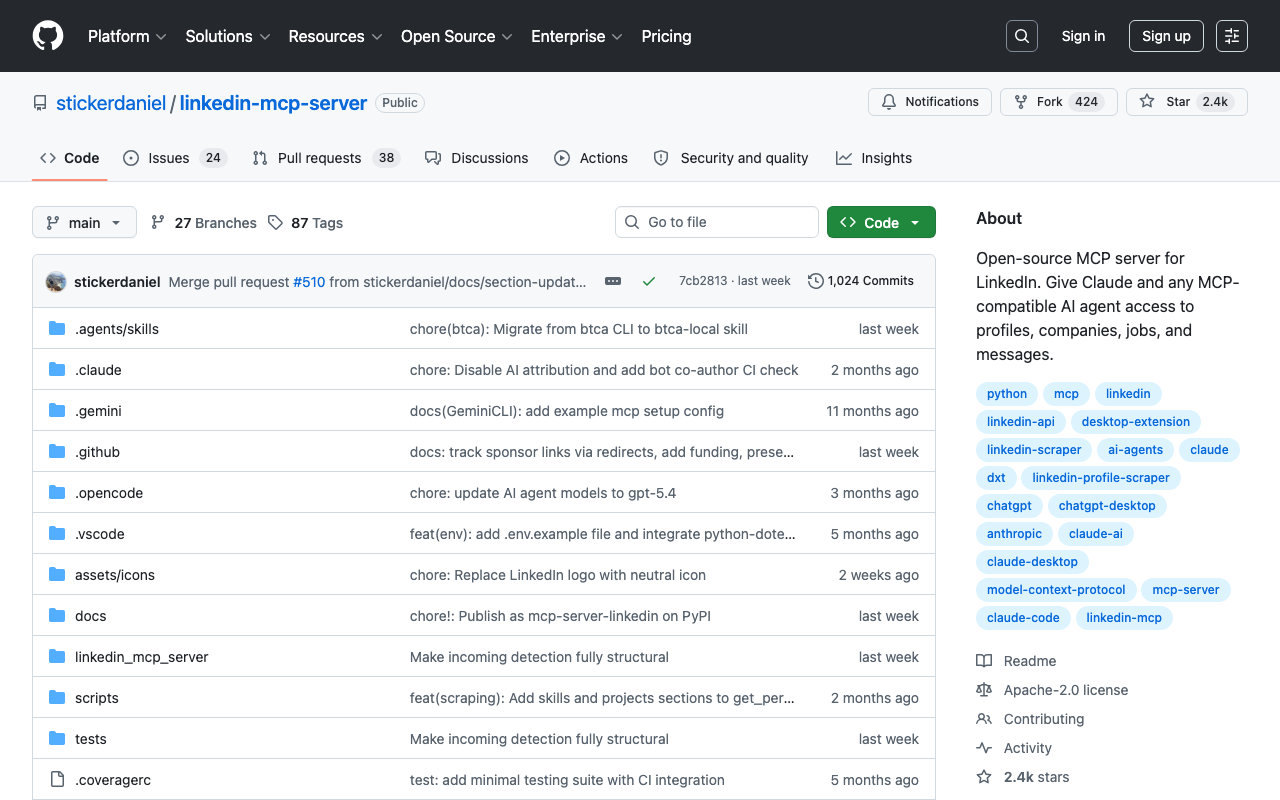
This open-source server gives Claude and other MCP clients access to LinkedIn data by driving a logged-in browser session. It can scrape profiles, companies, and job listings, and read your inbox. It is the most complete of the community scrapers.
Setup is for developers: you run it via Docker or uvx, and the first authenticated call opens a browser window to log in (you may have to solve a captcha by hand). Because it automates your real session, there is a genuine risk LinkedIn flags or restricts the account. Good for research and custom dev, not for safe daily posting. More on the open-source repos in our GitHub roundup.
adhikasp/mcp-linkedin: lightweight feed and job reads
This one is a smaller open-source project that talks to an unofficial LinkedIn API. It can read your feed and search jobs, including matching listings against a resume. It is popular and easy to try.
The catches: it authenticates with your LinkedIn email and password, it relies on an unofficial API, and the maintainer explicitly says use it at your own risk. Fine for quick experiments, not something to point at an account you care about.
Composio LinkedIn MCP: managed actions in workflows
Composio is a platform that packages app integrations as MCP-ready actions, LinkedIn included. You connect once and call LinkedIn actions from inside an agent without writing the integration yourself.
It is a solid choice if you are already building agents on Composio and want LinkedIn as one node among many. It is third-party rather than official, and the exact actions and account-safety depend on how the connection is set up. We compare it head to head with Zapier in our Zapier vs Composio guide.
Zapier LinkedIn MCP: no-code cross-app automation
Zapier exposes its LinkedIn integration through MCP, so an AI assistant can trigger Zapier actions like posting an update or kicking off a multi-step zap. The big win is no-code: if you already live in Zapier, this plugs LinkedIn into the same automations as your other tools.
It uses Zapier's official LinkedIn connection, which is safer than raw scraping. The tradeoff is that you are limited to the LinkedIn actions Zapier supports, and you need a Zapier plan. Details in the same comparison.
Bright Data / Apify: data extraction at scale
Bright Data and Apify are not content tools. They are data platforms built to extract LinkedIn information at volume, profiles, company pages, job feeds, for lead generation, market research, or enrichment pipelines.
If your job is to collect a lot of structured LinkedIn data and feed it into a database or model, these are the grown-up option, with proxies and infrastructure made for scraping. They are usage-priced and overkill if all you want is to post and measure your own content.
How to choose
It comes down to one question: are you producing content or consuming data?
- You want to write, schedule, publish, and analyze your own posts: go with the official Taplio LinkedIn MCP. No-code, account-safe, made for this.
- You are a developer who needs to scrape profiles, companies, or jobs for a project: stickerdaniel's server is the most capable open-source pick, with ban risk to manage.
- You want quick feed reads or job-matching to tinker with: adhikasp's server is the lightweight try.
- You are building agent automations: Composio or Zapier let you wire LinkedIn into bigger flows without custom code.
- You need bulk data extraction: Bright Data or Apify.
If you are mixing goals, it is common to run Taplio for posting and a separate scraper for research, since they barely overlap.
FAQ
What is the best LinkedIn MCP server?
For managing your own LinkedIn content (drafting, scheduling, publishing, and analytics), the official Taplio LinkedIn MCP is the best pick because it is no-code and runs on your own account with no scraping. For raw data extraction, an open-source scraper like stickerdaniel's server is a better fit, with more setup and account-ban risk.
Is there an official LinkedIn MCP server?
The Taplio LinkedIn MCP is an official server built by Taplio. It connects through your Taplio account and does not scrape LinkedIn or automate a browser. Most other LinkedIn MCP servers are community or third-party projects rather than official products.
Will a LinkedIn MCP server get my account banned?
Servers that scrape LinkedIn or use unofficial APIs, like the open-source options, carry a real risk of restriction or a ban because they automate your real session. The Taplio LinkedIn MCP avoids this by acting through your own Taplio account, and Zapier uses LinkedIn's official connection, so both are safer than raw scraping.
Can a LinkedIn MCP server post for me automatically?
With the Taplio LinkedIn MCP it can draft, schedule, and publish, but nothing goes live without your explicit confirmation, so there are no surprise posts. Other servers depend on the actions they expose and the permissions you grant.
What does Reddit say about LinkedIn MCP servers?
Discussion tends to split the same way this guide does: open-source scrapers get praised for free data access but flagged for setup hassle and ban risk, while people who just want to post and measure content lean toward an official, no-code option. Pick based on whether you are extracting data or creating content.
Conclusion
The best LinkedIn MCP server is the one that matches your job. For your own content, the official, no-code, account-safe Taplio LinkedIn MCP is the clear pick. For raw data, the open-source scrapers and data platforms win, with setup and risk attached.
Ready to draft, schedule, and analyze your LinkedIn posts straight from Claude or Cursor? Connect the Taplio LinkedIn MCP and run your first post in minutes. Once it is connected, the free Claude Skills for LinkedIn give your assistant ready-made playbooks, from a post writer to a content calendar, that run on the same MCP.


Keep reading
All articlesRelated Articles


.avif)
Your Linkedin AI coach is waiting for you
Join 12,000+ creators who let their coach turn the blank page into a plan and watch their audience compound.
7-day free trial · 30 day money back · Cancel anytime
AVG. VIEWS
2,979
-1.5%
ENGAGEMENT
3.2%
+0.8%

Free Monthly Report
How does your LinkedIn compare?
Get free monthly benchmarks on reach, engagement, and content format performance.
Get the Benchmark