
Pricing


How to Install Taplio's Claude Skills for LinkedIn (Step by Step)

June 19, 2026

5
min read

 Open in ChatGPT
 Open in Claude
 Open in Perplexity

Key Takeaways
- Taplio ships 17 free Claude skills for LinkedIn: the library includes a post writer, hook generator, carousel builder, content calendar, and analytics interpreter.
- Skills and the MCP are two layers: skills are the playbooks that teach Claude a job, while the Taplio MCP is the live connection that lets Claude act on your real account.
- The skills group into four areas: content writing, research and inspiration, strategy, and analytics, covering the whole LinkedIn workflow.
- A skill is just a markdown file: download the full bundle or pick individual skills, each with a one-click Download SKILL.md, Copy markdown, and See on GitHub option.
- Install anywhere you use Claude: the guide covers Claude Code, Claude web, ChatGPT, and Cursor, and connecting the MCP so skills run on your account instead of guessing.
Taplio ships a free library of 17 Claude skills for LinkedIn: a post writer, hook generator, carousel builder, content calendar, analytics interpreter, and more. Each one is a small instruction file that teaches Claude to do a LinkedIn job the way a specialist would. This guide walks through installing all of them, whichever way you use Claude, and connecting the Taplio MCP so they run on your real LinkedIn account instead of guessing.
There are two layers here, and it helps to keep them straight. The skills are the playbooks (the how-to). The Taplio MCP is the live connection that lets Claude act on your account (the hands). You can install the skills on their own, but they are far more useful with the MCP connected. We will do both.
The skills are the playbook, the Taplio MCP is the hands
What you are installing
The library covers the whole LinkedIn workflow, grouped into four areas: content writing (post writer, hook generator, carousel builder, repurposer, story extractor, CTA optimizer), research and inspiration (niche creator finder, viral post analyzer, trending topics scanner, swipe file builder), strategy (niche definer, content pillars builder, audience persona builder, content calendar planner, profile optimizer), and analytics (post performance critic, analytics interpreter). All 17 are free.
The 17 skills, grouped by Writing, Research, Strategy and Analytics
Step 1: Get the skills
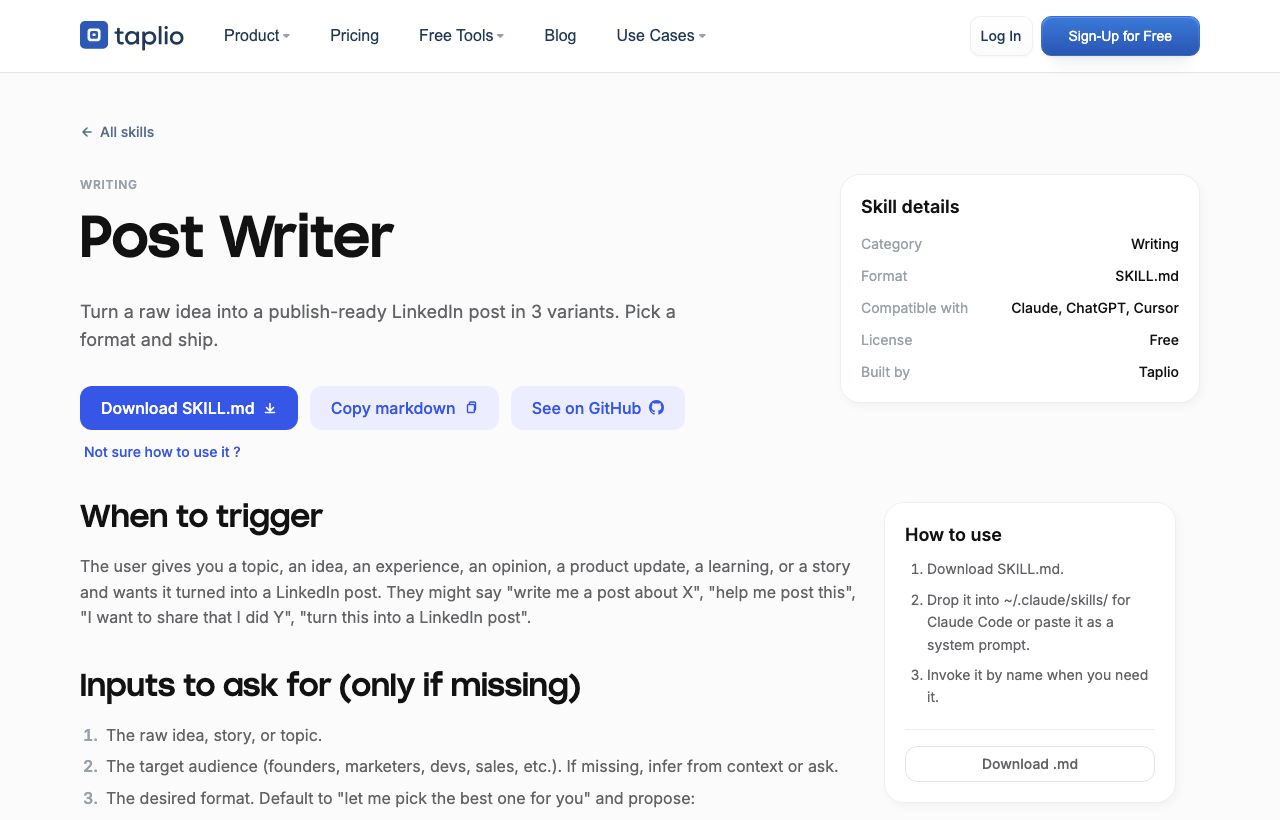
Open the Claude Skills for LinkedIn library. You have two options:

Either way you end up with one or more .md files on your machine. That is all a skill is: a markdown file with a name, a description, and instructions.
Each skill also has its own page with a one-click Download SKILL.md, a Copy markdown button, a See on GitHub link, and a short "How to use" recap.
Step 2: Install them in Claude Code
If you use Claude Code, skills live in a folder. Unzip the bundle and move the .md files into your skills directory:
~/.claude/skills/
You can keep the category folders or flatten them, both work. Then reload Claude Code. Each skill is now available by name. To use one, just ask:
use the post-writer skill to turn this idea into a LinkedIn post
Claude loads that skill's instructions and follows them.
The shortcut: just ask Claude Code to install them
If you use Claude Code on desktop, you can skip the download and file-moving entirely. Open Claude Code, paste the GitHub repo link, and ask it to install the skills for you:
Install the Claude skills from https://github.com/TaplioOfficial/taplio-skills into my skills folder
Claude Code clones the repo, drops the skill files into ~/.claude/skills/, and reloads them itself. When it finishes, invoke any skill by name, exactly as above.
Step 3: Or paste a skill into Claude web, ChatGPT, or Cursor
You do not need Claude Code. Skills are plain prompts, so they work anywhere:
This works in Claude.ai, ChatGPT, Cursor, or any LLM chat. The skill steers the model for that conversation.
Step 4: Connect the Taplio MCP so the skills run live
The skills write well on their own, but without a connection to your account they are guessing about your voice, your audience, and what is working. Connecting the Taplio LinkedIn MCP fixes that: the skills can then pull your real inspiration, draft on your account, schedule, and read your analytics. There are two ways to add it, and you do not need a terminal for the first one.
As a custom connector (Claude web or ChatGPT, no terminal): open Settings, go to Connectors, click Add custom connector, paste the server URL, and authenticate with your Taplio account.
https://mcp.taplio.com

In the terminal (Claude Code, Cursor):
claude mcp add --transport http taplio https://mcp.taplio.com
On the first call you sign in with your Taplio account, and the MCP acts as you from then on. For the full picture of the connection, see the Taplio LinkedIn MCP page.
Step 5: Run your first skill
With a skill loaded and the MCP connected, try a real request:
use the hook generator skill to write 10 hooks about cold outreach, then draft a post from the best one and save it as a draft
The skill supplies the method, the MCP does the work on your account, and nothing publishes until you approve it. That is the full loop: a skill plus the MCP turns a prompt into a finished, scheduled post.
FAQ
Are Taplio's Claude skills free?
Yes. All 17 skills in the Claude Skills for LinkedIn library are free to download and use, as files or as prompts. The Taplio MCP works with your existing Taplio account.
Do I need Claude Code to use the skills?
No. Claude Code lets you drop the skill files into a folder, but the skills are plain prompts, so you can paste them into Claude.ai, ChatGPT, or Cursor instead. The MCP can also be added without a terminal, as a custom connector in the web app.
Where do Claude Code skills go?
In the ~/.claude/skills/ directory. Move the .md files there, reload Claude Code, and invoke a skill by name.
Do the skills need the Taplio MCP to work?
No, but they are much better with it. As plain prompts the skills still guide Claude. Connected to the Taplio MCP, they run on your real LinkedIn data: your voice, your audience, live inspiration, your analytics, and the ability to draft and schedule.
Which skill should I install first?
Start with the post writer and the hook generator if you publish, or the analytics interpreter if you want to understand what is working. You can always add the rest from the bundle later.


Keep reading
All articlesRelated Articles

.avif)
Your Linkedin AI coach is waiting for you
Join 12,000+ creators who let their coach turn the blank page into a plan and watch their audience compound.
7-day free trial · 30 day money back · Cancel anytime
AVG. VIEWS
2,979
-1.5%
ENGAGEMENT
3.2%
+0.8%

Free Monthly Report
How does your LinkedIn compare?
Get free monthly benchmarks on reach, engagement, and content format performance.
Get the Benchmark