
Pricing


LinkedIn Private Mode: How to Anonymously View Profiles

January 28, 2025

8
min read

 Open in ChatGPT
 Open in Claude
 Open in Perplexity
Key Takeaways
- LinkedIn private mode makes you anonymous in 3 clicks: go to "Settings and Privacy", open "Visibility", click "Profile viewing options" and select "Private mode". Profile owners then only see "Anonymous LinkedIn Member". The feature is free.
- LinkedIn offers 3 visibility levels: your full name and headline, semi-private mode (job title, company, and industry only), or fully private mode.
- The trade-off: with private mode on, a free LinkedIn account loses access to its own "Who viewed your profile" list.
- LinkedIn Premium removes that trade-off: Premium subscribers can browse anonymously and still see who viewed their profile over the last 90 days.
- Best uses of private mode: monitoring competitors, researching prospects discreetly before an outreach, screening candidates, and studying strong profiles in your industry for inspiration.
Every time you view someone’s profile, LinkedIn sends them a notification.
While it can be helpful for networking and making connections, sometimes you want to browse LinkedIn profiles anonymously.
Maybe you’re researching the competition, exploring career opportunities, or just wanting to browse profiles with no intention to engage.
This is where LinkedIn private mode comes in and allows you to view someone’s LinkedIn profile anonymously.
We’ll share how to turn on LinkedIn private mode and discuss its potential benefits.
What Is LinkedIn Private Mode?
LinkedIn Private Mode is a feature that allows you to visit other members’ profiles anonymously. While LinkedIn will inform them that someone has viewed their profile, they won’t be able to identify the viewer.
There are 3 visibility options available on LinkedIn:
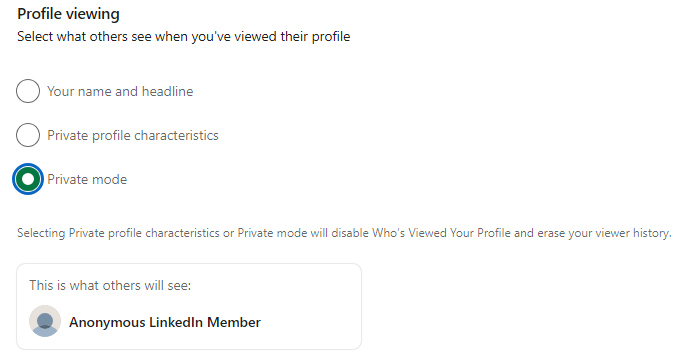
- Private mode. With this mode, you can view profiles 100% anonymously. LinkedIn will only inform them that an “Anonymous LinkedIn Member” has viewed their profile.
- Private profile characteristics. LinkedIn only shows your job title, company, school, and industry. It does not display your name and headline.
- Your name and headline. This option lets people know your name, LinkedIn headline, and connection degree.
How to Turn On LinkedIn Private Mode
With private mode enabled, LinkedIn members still receive notifications that someone viewed their profile, but they can’t see your name or job title.
Instead, they get the LinkedIn Member – This person is viewing profiles in private mode message with no other information being shared with them.
Here’s how to enable Private Mode:
1. Click on your profile icon.
2. Select Settings & privacy and go to Visibility.
3. Click Profile viewing options and select Private mode.
How to turn on LinkedIn Private Mode on Mobile
Here’s how you can use LinkedIn private mode on mobile (iOS or Android):
- Tap on your profile picture.
- Go to Settings.
- Open the Visibility menu.
- Tap “Profile viewing options”
- Select the “Private mode” option to view other LinkedIn members’ profiles privately.
LinkedIn Private Mode: Best Uses and Benefits
Let’s look at a few ways you can use LinkedIn private mode, depending on what your goals are.
1. Learn how to improve your profile
If you’re new to the platform or just looking to improve your online presence, staying invisible is a great way to do your research.
You can view LinkedIn profile anonymously and gather valuable information to help you improve your profile.
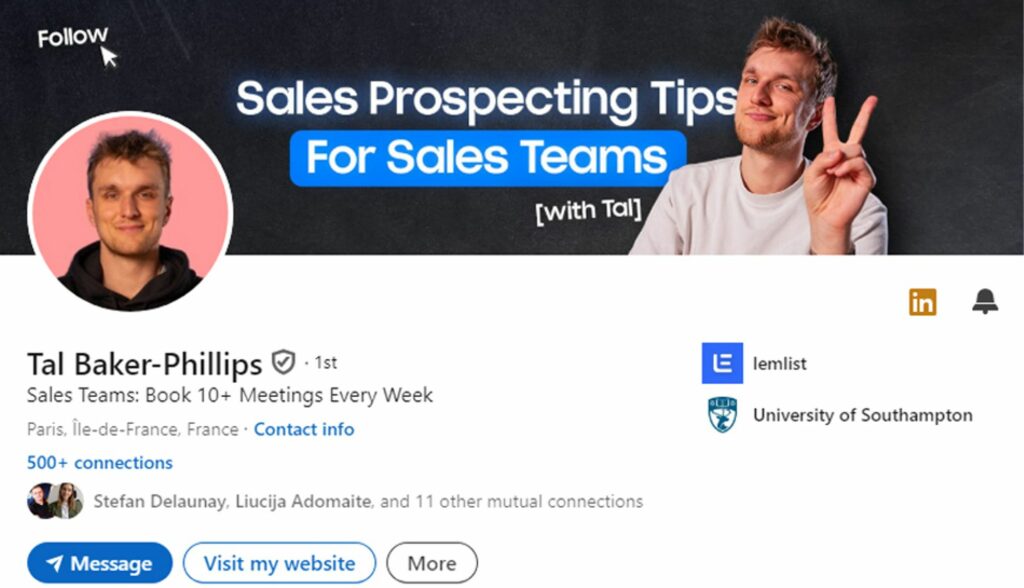
Look for members in the same industry or with the same interests as you. Notice how they set up their profiles and position themselves in the industry. Their content can also serve as a guideline or an inspiration source.
2. Monitor your competitors
Keep track of your competition without them knowing. Here’s how you can take advantage of LinkedIn private mode:
- Analyze their network. Find business partners and potential customers by exploring their connections.
- Find new leads. Check who engages with their content to find new prospects within their network. People interacting with your competitors’ content are often interested in similar services or products.
- Keep up with industry trends. Stay updated on what’s happening in your industry by monitoring your competitors’ content, new roles, and initiatives.
3. Research your prospects discreetly
Think about a potential client knowing that you repeatedly viewed their profile before you reach out.
It could feel intrusive and ruin your chance of making a positive first impression.
With LinkedIn private mode, you can view their profile as often as needed and gather the information you need to personalize your outreach.
4. Find new talent
Every 8 seconds, someone gets hired on LinkedIn. While LinkedIn is the best platform to find new talent to join your team, researching potential candidates can be tricky.
LinkedIn private mode allows you to discreetly check your candidates’ profiles and review their experience, skills, and endorsements.
This helps you create a strong shortlist without any pressure or unintended consequences.
What are the drawbacks of LinkedIn’s Private Mode?
1. You Lose the “Who Viewed Your Profile” List
When you turn on Private Mdoe, LinkedIn stops showing who viewed your profile. This means you might miss the chance to connect with potential clients, recruiters, or industry peers.
2. Missed Engagement Opportunities
When people get a notification that you visited their profile, chances are they will take a look at your profile in return. This creates a networking opportunity, and if your profile piques their interest, they might send you a connection request.
So, how can yo view Linkedin profile anonymously while you can still see who checked your profile?
Use Private Mode on LinkedIn Premium
You can browse LinkedIn in Private mode and still see who viewed your profile in the last 90 days by subscribing to LinkedIn Premium.
However, even with a LinkedIn Premium account, you won’t be able to see every LinkedIn member who has visited your profile. Those who have turned on Private Mode will remain anonymous.
The good news is that LinkedIn offers a 30-day free trial, so you can test it before paying.
Frequently Asked Questions
Do I need a Premium account to view profiles anonymously?
No, LinkedIn private mode is free. However, with private mode enabled, you can’t see the list of people who visited your profile.
Can I use private mode and still see my profile viewers?
To browse LinkedIn privately and still see who visited your profile, you have to subscribe to LinkedIn Premium.
What’s the difference between private and semi-private mode?
LinkedIn private mode doesn’t share any information when you view other profiles.
When you view LinkedIn profiles in semi-private mode, certain information is available. This usually includes your job title, company, and industry.
Is there a limit on how many profiles I can view in private mode?
There’s no limit on the number of LinkedIn profiles you can view anonymously. However, you should know that LinkedIn limits overall profile views to stop spamming behavior.
Can Premium members see that I viewed their profile?
Premium subscribers can’t see that you viewed their profile if you’re using LinkedIn private mode. You will remain anonymous, whether they have a free or Premium account.
Key takeaways
You can anonymously check people’s LinkedIn profiles without them knowing with LinkedIn private mode.
When using LinkedIn private mode, you can’t see who visited your profile. To browse LinkedIn anonymously and still see who viewed your profile, you have to subscribe to LinkedIn Premium.
LinkedIn private mode can give you an advantage when improving your LinkedIn profile, looking for talent, generating leads, or keeping tabs on your competitors.
Using LinkedIn’s private mode for a long time could lead to missed engagement opportunities. You might miss connecting with recruiters, industry peers, or potential clients.


Keep reading
All articlesRelated Articles
.avif)
Your Linkedin AI coach is waiting for you
Join 12,000+ creators who let their coach turn the blank page into a plan and watch their audience compound.
7-day free trial · 30 day money back · Cancel anytime
AVG. VIEWS
2,979
-1.5%
ENGAGEMENT
3.2%
+0.8%

Free Monthly Report
How does your LinkedIn compare?
Get free monthly benchmarks on reach, engagement, and content format performance.
Get the Benchmark