
Pricing


How to Create a LinkedIn Business Page (2026 Guide)

August 18, 2026

11
min read

 Open in ChatGPT
 Open in Claude
 Open in Perplexity

Key Takeaways
- Creating a page is free and takes ten minutes: the constraint is having the logo, cover image, tagline and public URL ready before you open the form.
- You need a personal profile to create one: at least seven days old with some connections, and there is no organisation-only account type.
- A page will never carry your reach: LinkedIn favours people over brands, so treat the page as your credibility and ads layer and your employees as distribution.
- The mobile flow exists but is hidden: profile picture, Settings, then Create a Company Page at the bottom of the list on both iOS and Android.
- Publish three posts before inviting anyone: an invitation to an empty page converts badly and you only get one first impression per contact.
A LinkedIn business page takes about ten minutes to create and most of them are abandoned within a month. The setup is not the hard part. Deciding what the page is for, and then feeding it, is.
This guide covers the decisions to make before you start, the creation flow on desktop and mobile, and the part almost every guide leaves out: what to do with the page once it exists.
What is a LinkedIn business page vs a personal profile?
A personal profile belongs to a person. A page belongs to an organisation. They look similar and behave completely differently.
| Personal profile | Business page | |
|---|---|---|
| Belongs to | One individual | An organisation, with multiple admins |
| Connections | Two-way connections, capped at 30,000 | One-way followers, uncapped |
| Can send invitations | Yes | Only to invite people to follow the page |
| Can comment as itself | Yes | Yes, on posts and as the page |
| Typical organic reach | Higher | Consistently lower |
| Can run ads | No | Yes, a page is required for advertising |
| Survives staff turnover | No | Yes |
The reach line is the one to internalise before you invest. LinkedIn favours people over brands, and a page post will almost always travel less far than the same post from an employee's profile. That does not make the page pointless, it makes it a different tool: the page is where credibility, ads and search live, and personal profiles are where reach lives. The organisations that do well on LinkedIn use both, deliberately.
It is also worth being clear about what a page is for before you build one, because "LinkedIn for business" covers three quite different jobs and the page only does two of them well. It is where people check that you are real, which matters more than it sounds when a prospect is deciding whether to reply. It is the required foundation for advertising, since you cannot run a LinkedIn ad without one. And it is a search asset: pages rank in LinkedIn's own search and, often, in Google for your company name. What it is not is a distribution engine. If your goal is reach, the page is the wrong lever and no amount of posting to it will change that.
Is it free to create a LinkedIn business page?
Yes, completely. Creating a page, posting to it, replying to comments, inviting followers and reading the analytics all cost nothing.
The paid layers sit on top and are optional: LinkedIn Ads, Sales Navigator and paid recruiter tools. None of them are required to run a page well, and none of them fix the underlying problem of an empty page. There is no premium tier that makes a page with four posts perform.
What do you need before you start?
LinkedIn will not let you create a page without these, so gather them first.
- A personal LinkedIn profile that is at least seven days old and has a few connections. LinkedIn uses this as a spam check.
- A company email address on the domain you are claiming. A generic mailbox will block verification for some page types.
- The official organisation name as you want it to appear, and a public URL you are happy to keep.
- A logo at 300 by 300 pixels and a cover image at 1128 by 191.
- A tagline of up to 120 characters. Write this before you start rather than improvising it in the form.
On the images specifically: the logo appears at roughly 60 pixels wide in the feed, so anything with small text in it becomes an unreadable smear. Use the mark rather than the full lockup if you have both. The cover image crops aggressively on mobile, and it crops from the centre, so anything you place near the left or right edge disappears for most viewers. Test both before you commit rather than after someone points it out.
Two of these are worth ten minutes of thought rather than ten seconds. The public URL is awkward to change later and appears in every link to the page. The tagline shows up under your name in search results and in the feed, which makes it the single most-read line the page has.
One more decision belongs here rather than in the form: who owns the page day to day. Pages fail more often from unclear ownership than from bad setup. If nobody is named, posting stops within about six weeks, and the page becomes a liability that shows a stale last-post date to every visitor. Name the person before you click create.
How to create a LinkedIn business page in 7 steps
On desktop, from a logged-in account.
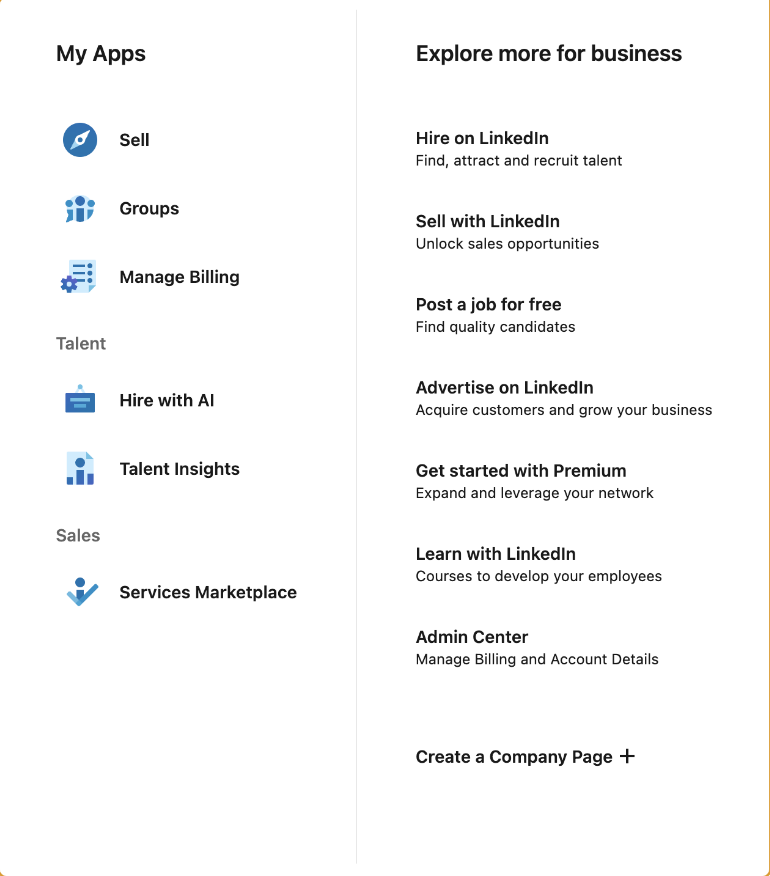
- Click For Business in the top navigation, then scroll to the bottom of the menu and select Create a Company Page.
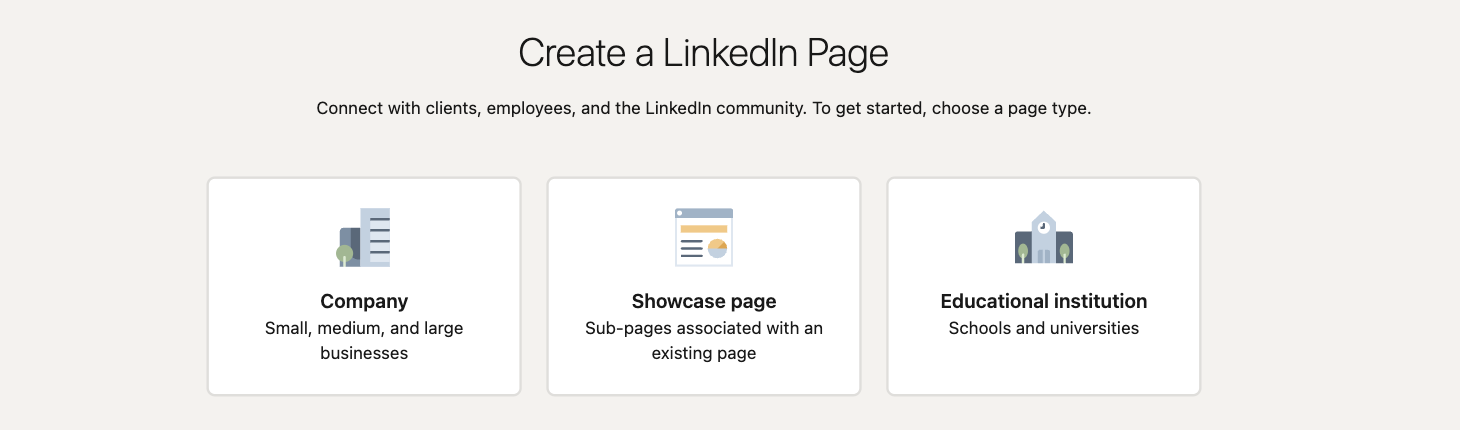
- Choose the page type: company, showcase page, or educational institution. Pick carefully, this is difficult to change afterwards.
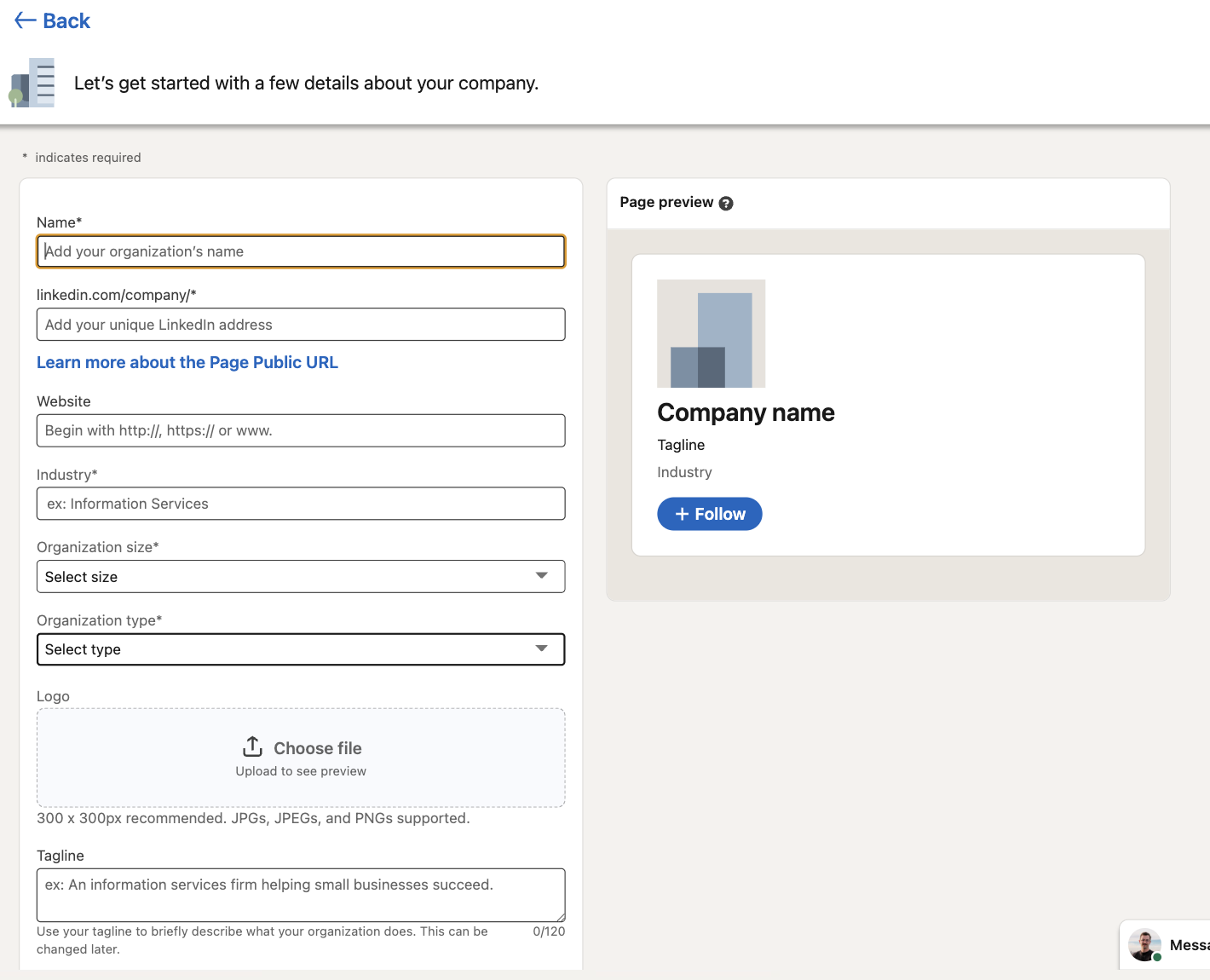
- Enter the name and the public URL. LinkedIn shows you whether the URL is available as you type.
- Add the industry, organisation size and type, all three required, plus the website, which is not. These feed LinkedIn's search filters, so vague answers cost you discoverability.
- Upload the logo and write the tagline. The Page preview panel on the right updates as you type and shows how the page will appear, so use it: the tagline that reads well in the form often looks wrong in the card.
- Tick the verification box confirming you are authorised to act on the organisation's behalf, then click Create page.
- Complete the About section, add the cover image, and publish a first post before inviting anyone.
That last step is the one people skip. An invitation to follow an empty page converts badly and you only get one first impression with each contact.
How to create a LinkedIn company page on the mobile app
The mobile flow exists and it is the same form in a narrower column, but the entry point is hidden well enough that most people conclude it is not possible.

On iPhone and iPad
- Tap your profile picture, top left.
- Tap Settings, then scroll to the bottom of the list.
- Select Create a Company Page.
- Fill in the name, public URL, website, industry and size, exactly as on desktop.
- Upload the logo, add the tagline, tick the verification box and tap Create page.
On Android
- Tap your profile picture, then Settings.
- Scroll to the bottom and tap Create a Company Page.
- Complete the same fields, then tap Create page.
Two honest caveats about doing this on a phone. Uploading a correctly sized logo and cover image is fiddly from a mobile photo library, and the live preview is cramped, so the tagline that looks fine in the form often reads badly in the feed. If you have access to a laptop, create the page there and use mobile for posting afterwards. If you do not, create it on mobile and plan to revisit the images later.
Can you create a company page without a personal profile?
No. LinkedIn requires a personal profile to create and administer a page, and there is no organisation-only account type.
This trips up agencies and freelancers constantly, and it also worries people who keep a deliberately low personal presence. The requirement is real and there is no workaround: LinkedIn ties every page to at least one human account for accountability, and accounts created purely to spin up a page tend to get flagged by the seven-day and connection checks.
What you can do is limit the exposure. The personal profile used to create the page is not displayed publicly as the owner, and you can add several admins afterwards so the page does not depend on one person. If you are creating a page for a client, add them as a super admin and remove yourself once they have accepted, otherwise the page stays attached to your account indefinitely.
Should you create a separate page for each business?
One page per legal entity, generally. Beyond that it depends on whether the audiences overlap.
If you run two genuinely different businesses serving different people, two pages. If you run one business with several product lines aimed at broadly the same audience, one page plus showcase pages, which are child pages designed exactly for this and which inherit some of the parent's credibility.
Showcase pages are underused and worth understanding before you decide. They sit beneath the main page, appear in a dedicated section on it, and let you speak to one segment without flooding everyone else. The trade is that they carry their own follower base and their own posting obligation, so an unfed showcase page has all the downsides of an abandoned page attached to a company you are actively promoting.
The argument against splitting is simple arithmetic. Followers do not transfer between pages and a page's reach is already modest. Two pages with 400 followers each perform worse than one with 800, and they cost twice the effort to feed. Split when the audiences genuinely have nothing in common, not when the org chart says so.
How to make your LinkedIn business page actually perform
This is where pages are won and lost, and it is the part LinkedIn's own documentation does not cover.
Accept that the page will not carry your reach
Company page posts reach a fraction of what the same content reaches from a personal profile. Plan around it rather than fighting it. The page is your credibility layer and your ad account; your people are your distribution.
Build employee amplification deliberately
The highest-leverage move available to a page is getting five or ten employees to post in their own voice about the work. Not resharing the page post, which performs poorly, but writing their own. A page with twenty engaged employees out-reaches a page with two thousand passive followers.
The practical version: tell people what is safe to talk about, give them the raw material, and stop asking them to reshare. Most employee advocacy programmes fail because they ask for the low-value action.
Post the formats that work for pages, not the ones that work for brands elsewhere
Pages default to announcements: funding, awards, hires, product releases. Those posts are read almost exclusively by people who already know you, which is the audience you least need to reach.
What works better on a page is anything that is useful without knowing the company: a lesson from a project, a number from your own operations, a clear explanation of something in your field, a customer problem and how it was solved. The test is whether a stranger would get something from the post if you removed the logo. Most page posts fail that test.
Two formats worth building into the rotation because they consistently outperform on pages: documents, which hold attention far longer than a link post, and posts written by a named person and published from the page with their photo attached. Attribution to a human is worth more than the polish of a brand voice.
Never post a bare link
A post whose main content is an external link is the weakest thing a page can publish. Put the substance in the post itself and the link in the first comment, or in the post but after you have already made the point. The page exists to be read, not to be a redirect.
Set a cadence you can hold
Two or three posts a week, held for six months, beats a launch burst followed by silence. Consistency is what the algorithm rewards and what makes a visiting prospect conclude the company is alive. If two a week is not realistic, do one. An abandoned page is worse than a sparse one, because the last-post date is visible to everyone.
Judge the page against the right numbers
Follower count is the least useful metric on the page. Engagement rate against your own follower base tells you whether the content lands, and profile visits tell you whether it sends anyone anywhere. If you want a reference point before setting targets, the LinkedIn benchmark has the medians by audience size, and reading your page against accounts of a similar size beats reading it against a flat number.
Run the page from a calendar, not from inspiration
Pages die when posting depends on someone remembering. Decide the recurring formats, fill a month ahead and schedule it. Scheduling is the difference between a page that survives a busy quarter and one that does not.
Reply to everything for the first six months
Comments on a small page are rare and each one is worth answering properly, from the page, within a few hours. It is the cheapest signal of a live organisation and it directly affects whether the post keeps circulating. Pages that let comments sit unanswered train their followers not to bother.
What to check before you launch
- Logo and cover image uploaded, and the cover checked on mobile where it crops hard.
- Tagline written for a human, not stuffed with keywords.
- About section complete, with the first two lines carrying the point.
- Custom button set to something you actually want, such as Visit website or Contact us.
- Industry, size and location filled in, since these drive LinkedIn search.
- At least three posts published before you invite anyone.
- Admins added, including someone other than the person who created the page.
- Employees prompted to add the company to their profiles, which links their profiles to the page and is free reach.
Frequently asked questions
Is it free to make a LinkedIn business page?
Yes. Creating a page, posting, replying, inviting followers and reading analytics are all free. LinkedIn Ads, Sales Navigator and recruiter products are separate paid products and none of them are required to run a page.
Can I create a company page on LinkedIn with a personal profile?
You need one. LinkedIn requires a personal profile at least seven days old with some connections to create a page. The profile is not shown publicly as the owner, and you can add other admins afterwards so the page is not tied to one person.
Should I create a separate LinkedIn page for my business?
Create one page per legal entity. For separate product lines aimed at a similar audience, use showcase pages under the main page rather than standalone pages, because followers do not transfer between pages and splitting an audience halves an already modest reach.
What is the difference between a LinkedIn account and a LinkedIn page?
An account is a person, with two-way connections capped at 30,000 and higher organic reach. A page is an organisation, with uncapped one-way followers, multiple admins, lower organic reach and the ability to run ads.
How long does it take to create a LinkedIn business page?
About ten minutes if you have the logo, cover image, tagline and URL ready beforehand. Without them, the form stalls at the upload step and most half-finished pages never get completed.
Can I change my LinkedIn page name or URL later?
The name can be edited in the page admin settings. The public URL is far more restrictive and in practice you should treat it as permanent, which is why it is worth deciding properly before you submit the form.
How often should a company page post on LinkedIn?
Two to three times a week, held consistently, is the realistic target for most organisations. One post a week held for a year beats five a week for a month, because an abandoned page shows its last-post date to every visitor.


Keep reading
All articlesRelated Articles

.avif)
Your Linkedin AI coach is waiting for you
Join 12,000+ creators who let their coach turn the blank page into a plan and watch their audience compound.
7-day free trial · 30 day money back · Cancel anytime
AVG. VIEWS
2,979
-1.5%
ENGAGEMENT
3.2%
+0.8%

Free Monthly Report
How does your LinkedIn compare?
Get free monthly benchmarks on reach, engagement, and content format performance.
Get the Benchmark