
Pricing


How to View Your LinkedIn Profile as Others See It

August 18, 2026

9
min read

 Open in ChatGPT
 Open in Claude
 Open in Perplexity
Key Takeaways
- Your logged-in view is not the profile: LinkedIn shows you edit buttons, analytics and hidden sections that no visitor ever sees.
- The built-in preview takes four clicks: Me, Settings and Privacy, Visibility, Edit your public profile. The shortcut is linkedin.com/public-profile/settings.
- The logged-out view is the one that matters: open your profile URL in a private tab, because that is roughly what Google indexes and it registers no profile view.
- Four visitor types see four different profiles: connections, second and third degree, out-of-network and logged-out visitors each get a different slice.
- Fix the visible block first: banner, photo, headline and the first two lines of About decide whether anything below them gets read.
You have read your own LinkedIn profile so many times that you cannot see it anymore. A stranger gets about seven seconds with it, and they see something quite different from what you see when you are logged in as yourself.
This guide covers the three ways to look at your profile through a visitor's eyes, what changes depending on who that visitor is, and what to fix once you have seen it.
Why you should view your LinkedIn profile as someone else
Three reasons, and the third is the one that costs money.
Your logged-in view is a lie. LinkedIn shows you edit buttons, analytics panels, suggestions and prompts that no visitor ever sees. It also shows you every section you have filled in, including ones that are hidden from the public. What you are looking at is an admin screen, not a profile.
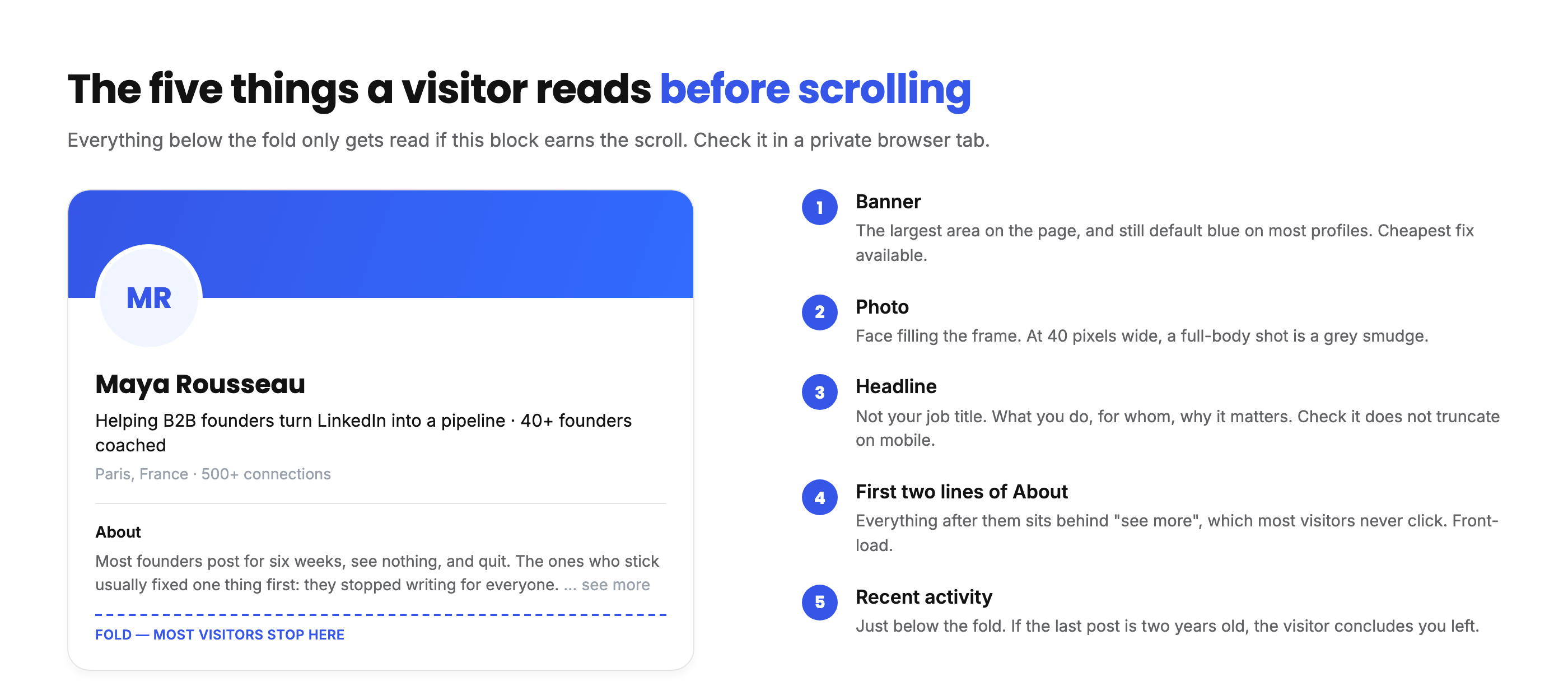
The first screen decides everything. A visitor sees your photo, your banner, your name, your headline and the top two lines of your About section before they scroll. That is the whole audition. Everything below it only gets read if that block earns the scroll.
Silent rejection is invisible to you. This is the expensive one. When someone opens your profile, is not convinced and closes the tab, nothing happens. No bounce notification, no feedback. A prospect who received your connection request and checked you out before deciding will never tell you that your headline was the reason they ignored it. You only see the silence, and silence looks identical to "they were busy".
If you are sending outreach, posting content or applying for roles, your profile is the landing page for all of it. Looking at it as a visitor is the cheapest audit you will ever run.
Start with the desktop preview, then check the logged-out view. The two together cover every visitor you will realistically get.
How to view your LinkedIn profile as a visitor, on desktop
LinkedIn has a built-in preview. It takes four clicks.
- Click the Me icon in the top navigation bar.
- Select Settings & Privacy.
- Open Visibility in the left rail.
- Click Edit your public profile.
The shortcut, if you want to skip the menu entirely: linkedin.com/public-profile/settings takes you straight there.
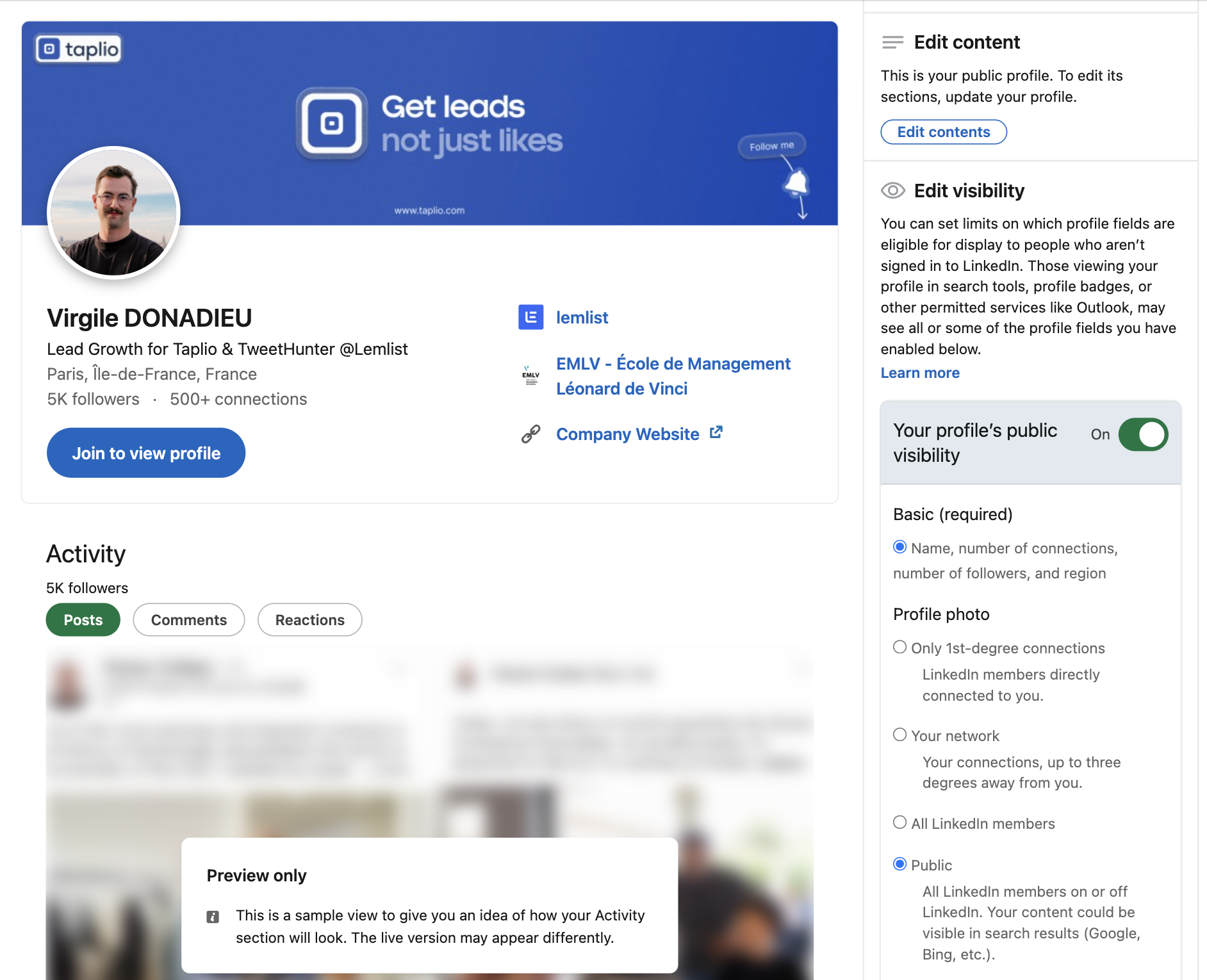
What opens is a live preview of your public profile with a panel on the right listing every section and a toggle for each one. Turn a section off and it disappears from the preview immediately. That panel is the single most useful screen on LinkedIn and almost nobody opens it.
One limitation worth knowing before you go looking for it: you can no longer preview your profile as a specific person, say a second-degree connection in your network. LinkedIn removed that feature. What you get is the public view and your own view, and you infer the rest.
How to view your LinkedIn profile as a visitor, on mobile
The mobile app has no public profile preview. There are two workarounds.
- Tap your profile picture, then View profile. Tap the three dots under your headline and select Share via to copy your profile URL.
- Paste that URL into a private browsing tab in Safari or Chrome on your phone.
That gives you the logged-out view on a phone screen, which is worth doing on its own. Most profiles are read on mobile, and the headline that fits neatly on a laptop often truncates halfway through a sentence on a phone.
How to view your profile as a logged-out visitor
Copy your profile URL, usually linkedin.com/in/yourname, and open it in a private or incognito browser window.
This is the view that matters most, for a reason people underestimate: it is also roughly what Google indexes. If your public profile is thin, your LinkedIn page ranks poorly for your own name, and anyone searching for you finds something else.
The logged-out view is stricter than the public preview inside LinkedIn. After a few profile pages, LinkedIn interrupts anonymous browsing with a sign-in wall, so check your own profile first before you use up the allowance on other people's.
If nothing shows up at all, your public visibility is switched off. That is fixable in the same settings panel, covered further down.
Viewing a LinkedIn profile without signing in
The same trick works on anyone, not just yourself, and it is the honest answer to a question people ask constantly: yes, you can view a LinkedIn profile without signing in, and no, it does not tell them anything.
What you get is the public profile: name, headline, photo, current role, the About section and public posts, assuming the owner left those switched on. What you do not get is contact details they kept private, the full connections list, or anything behind LinkedIn's login wall. Free profile viewer tools that promise a login-free lookup are reading exactly this same public page. None of them can reach past it, whatever the landing page claims.
There is a practical ceiling. LinkedIn tolerates a handful of anonymous profile views per browser session and then throws up a sign-in prompt. Clearing cookies resets it, but if you are checking profiles regularly, private mode inside your own account is the less irritating route.
What different people see when they open your profile
Four visitor types, four different profiles. This table is the part most guides skip.
| 1st-degree connection | 2nd and 3rd degree | Out of network, signed in | Logged out | |
|---|---|---|---|---|
| Full name | Yes | Yes | Yes | Yes, if public |
| Photo, headline, About | Yes | Yes | Yes | Only sections set to public |
| Contact info | Yes | Only what you made public | Only what you made public | Only what you made public |
| Full work history | Yes | Yes | Yes | Only if the section is public |
| Connections list | Yes, if you allow it | Shared connections only | No | No |
| Your recent posts | Yes | Yes | Yes | Public posts only |
| Your visit registers | Yes | Yes | Yes | No |
Two rows deserve attention. Contact info is public far more often than people realise, because LinkedIn asks for it once during onboarding and never mentions it again. And the last row is the reason logged-out checking is genuinely anonymous: a signed-out visit is not recorded, so it never reaches anyone's "Who's viewed your profile" list.
How to control what others see: 5 visibility settings
All five live in the same public profile settings panel you opened earlier.
1. Make your profile public, or decide what stays private
The right-hand panel opens on a master switch, "Your profile's public visibility", and below it a toggle for each section: background photo, headline, websites, articles and activity, current experience, past experience, education, certifications and recommendations. Your name, connection count and region sit under "Basic (required)" and cannot be hidden.
Your profile photo is the exception with its own set of options rather than a single toggle: visible to first-degree connections only, to your network, to all LinkedIn members, or fully public. Worth checking, because the default is not always the one you assume.
My default recommendation is to make everything public. If you post content, your profile is the destination, and hiding half of it defeats the point. The exception is a discreet job search, where you may want your current role visible but your activity hidden.
2. Claim a custom profile URL
LinkedIn assigns you a URL with a random string on the end. Replace it with your name. It is easier to remember, it looks better in an email signature or on a CV, and it is a small ranking signal for searches on your own name. Same settings page, edit the public profile URL field.
3. Add a public profile badge
The same panel generates an embeddable badge for a personal site, a portfolio or an online CV. It is a straightforward way to send traffic from a site you own to a profile you control.
4. Turn off "People also viewed"
By default, LinkedIn shows a sidebar of similar profiles next to yours. It is a useful discovery feature for LinkedIn and a leak for you: a visitor who came to read about you leaves through a list of your competitors. Turning it off keeps the attention on your page.
5. Choose how you appear when viewing others
The setting is called "Visibility when viewing other profiles", under Visibility of your profile and network, and it has three options: your name and headline, private profile characteristics, or full private mode.
Read LinkedIn's own warning on that screen before you touch it: selecting either private profile characteristics or private mode disables Who's Viewed Your Profile and erases your viewer history. Not pauses it, erases it. On a free account you lose the list entirely; Premium keeps the last 90 days.
What to fix once you have seen your profile
Run through this in order. The first four items are the visible block, and they carry most of the weight.
- The photo. Face taking up most of the frame, decent light, current. A full-body shot at 40 pixels wide is a grey smudge.
- The banner. Still the default blue for most people. It is the largest piece of real estate on the page and the cheapest to fix.
- The headline. Not your job title. What you do, for whom, and why it matters. Check that it does not truncate on mobile.
- The first two lines of your About. Everything after them is behind a "see more" click that most visitors never make. Front-load.
- The featured section. Empty on most profiles. It is the one place you can put a link that converts a visitor into something measurable.
- Your recent activity. If your last post is from 2023, a visitor concludes you left. If you are going to have a profile worth visiting, it needs something recent on it.
- Contact info. Open it as a logged-out visitor and confirm you are comfortable with what is there.
A quick way to run the whole list: open your profile in a private tab, then read only the visible screen and write down the first thing you would ask if you had never met yourself. If the answer is "what does this person actually do", the headline is the problem. If it is "is this account still active", the activity section is. Most profiles fail on one of those two, and both are twenty-minute fixes.
Do this again every quarter. Roles change, banners go stale, and the featured link you added last year now points at a page that no longer exists.
Once the profile holds up, the constraint moves elsewhere: people have to reach it. Profile visits come from posting and commenting, so if you want more of them, that is where the work is. Watching profile views next to your post performance is how you tell which posts actually sent people to your page.
What your LinkedIn profile view count is actually telling you
Once the profile is fixed, the LinkedIn profile view number becomes a usable feedback loop rather than a vanity figure. Read it against what you did that week, not in isolation.
A jump the day after a post means the post sent people to your page, which is the whole job of a post. A flat number during a week you published three times means the posts were seen but the byline did not make anyone curious, and that is usually a headline problem, not a content problem.
The composition matters more than the count. Ten views from recruiters in your target industry beats a hundred from unrelated accounts, and the free account gives you enough of the picture to tell the difference even without names attached. If you are job hunting and no recruiter has appeared in weeks, the profile is not reaching the right feed, and no amount of rewriting the About section fixes a distribution problem.
One habit worth building: check the logged-out view again after any significant edit. Section toggles reset in ways people do not expect, and a profile that looked complete last month can quietly lose its About section to a settings change.
Frequently asked questions
Can I view a profile on LinkedIn without them knowing?
Yes, in two ways. Set your visibility when viewing other profiles to private mode, and your visit shows up as an anonymous LinkedIn member. Or open the profile URL while logged out, which registers no view at all. The logged-out route only shows the public version of the profile.
Can someone see if I viewed their LinkedIn?
By default, yes: your name, photo and headline appear in their viewer list. It depends entirely on your own setting, which you can change at any time in Settings and Privacy, under Visibility.
Can I hide that I viewed someone's LinkedIn profile?
Yes. Switch your profile viewing option to private profile characteristics, which shows only your job title and industry, or to private mode, which shows nothing. On a free account, private mode also hides your own list of profile viewers.
What triggers a profile view on LinkedIn?
Opening someone's profile page while signed in. Seeing their name in the feed, in search results, in a comment or in a notification does not count, and neither does opening their profile while logged out.
How do I make my LinkedIn profile public?
Go to Settings and Privacy, then Visibility, then Edit your public profile. Turn on the master visibility switch and toggle each section you want visible to logged-out visitors and to search engines.
Can I view my LinkedIn profile as a specific person?
No. LinkedIn removed that option. You can see the public version and your own version, and the table above covers what each type of visitor gets in between.


Keep reading
All articlesRelated Articles
.avif)
Your Linkedin AI coach is waiting for you
Join 12,000+ creators who let their coach turn the blank page into a plan and watch their audience compound.
7-day free trial · 30 day money back · Cancel anytime
AVG. VIEWS
2,979
-1.5%
ENGAGEMENT
3.2%
+0.8%

Free Monthly Report
How does your LinkedIn compare?
Get free monthly benchmarks on reach, engagement, and content format performance.
Get the Benchmark