
Pricing


How to Write a LinkedIn Summary: Examples, Templates, and Expert Tips

November 19, 2024

11
min read

 Open in ChatGPT
 Open in Claude
 Open in Perplexity
Key Takeaways
- A completed LinkedIn summary earns up to 3.9x more profile views: the About section is the most valuable white space on your profile, not a place to paste your resume.
- You have 3 to 5 seconds to hook a visitor: the opening lines must force a click before LinkedIn truncates the text behind See more.
- Copy-pasting a resume kills engagement: a robotic third-person description hides your story and fails the algorithmic keyword weight the section carries.
- Follow a 4-part expert formula: the guide provides a structured narrative approach plus 5 proven examples and 3 fill-in-the-blank templates.
- The summary doubles as SEO: a strategic About section carries heavy weight for keyword searches, helping the right recruiters find you.
Imagine landing on a profile and feeling an instant connection to a person you have never met.
This is the power of a perfect LinkedIn summary. Most professionals treat this space like a digital attic, filled with dusty resume fragments and robotic third-person descriptions, which I see as a massive missed opportunity for growth.
Your "About" section functions as your personal billboard in a crowded digital city. You have exactly three seconds to capture a recruiter's attention before they scroll past. Profiles with a completed summary earn nearly four times more views than those without.
I want to help you turn this "white space" into your most effective sales tool. Let’s build a narrative that turns strangers into connections.
Why your LinkedIn summary is the most valuable space on your profile
This section serves as your primary internet identity rather than a simple CV. While many professionals treat it as a secondary thought, I prioritize it as the most vital "white space" available on the platform, a concept popularized by expert Andy Foote.
In my experience, success on LinkedIn starts with the fact that a profile visitor makes a decision within a tiny 3 to 5-second window.
Copy-pasting a resume into this field remains a strategic mistake that kills engagement. This approach fails because LinkedIn truncates the text, hiding the bulk of your story behind a "see more" link on both mobile and desktop views. The focus remains on crafting a narrative that forces a click before that cutoff point to capture immediate interest.
The benefits of a well-crafted summary are measurable and significant:
- Massive reach: LinkedIn research proves that profiles featuring completed summaries earn up to 3.9 times more views.
- Algorithmic advantage: A strategic "About" section carries heavy weight for keyword searches to ensure the right recruiters find you.
- Network growth: I share insights on how to network on LinkedIn to ensure this high-traffic space converts visitors into connections.
- Brand authority: Building a summary that highlights your unique journey creates a professional edge that simple lists of skills lack
How to audit and optimize your summary with Taplio's free AI tools
The "About" section should not be viewed in isolation; it is a vital component that operates within a much broader professional framework. Based on Taplio's optimization framework, a summary only converts visitors if the top-of-page elements (the banner, profile picture, and headline) are sharp enough to earn that downward scroll.
To instantly audit my professional ecosystem, I use a LinkedIn profile optimization tool. This is crucial for guaranteeing that a new summary not only presents well but is also in perfect alignment with my overall professional brand.
To maximize the impact, focus on the following three core pillars:
- Strategic Alignment: Engagement with a summary is a direct result of strong top-of-page elements. If the headline doesn't hook the viewer, the "About" section remains unread.
- Brand Consistency: Evaluating the profile as a unified identity ensures the narrative remains cohesive from the banner down to the final call to action.
- Data-Driven Efficiency: Relying on automated tools provides the fastest route to identifying exactly where a profile setup is leaking potential connections.
The 4-part expert formula for a high-converting summary
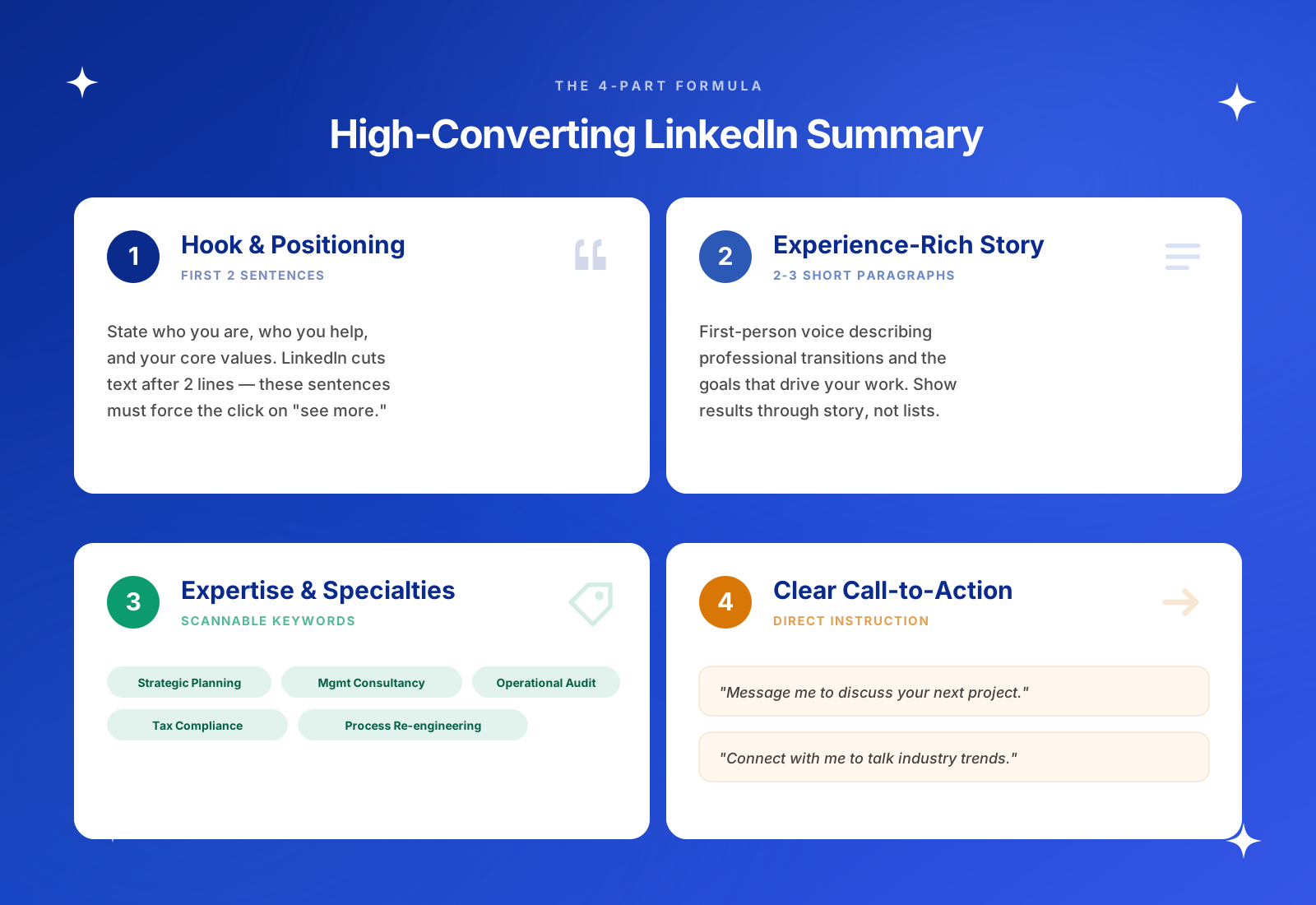
Structuring a summary requires a balance between human storytelling and algorithmic visibility. My approach is based on a distinct four-part framework, ensuring every word is intentional, designed to capture attention and guide the reader toward a specific final action.
1. The hook and positioning (first 2 sentences)
Place the most critical information at the very top. State who you are, who you help, and your core values. LinkedIn hides text after two lines, so these sentences must act as a headline that forces the reader to click "see more."
2. The experience-rich story (2 to 3 short paragraphs)
This section highlights the human element. Use a natural, first-person voice to describe professional transitions and the goals that drive the work. Focus on showing results through a story rather than just listing facts.
3. Expertise and specialties
LinkedIn search relies on scannable data. Include a section for core skills mapped to specific search terms:
- Strategic Financial Planning
- Management Consultancy
- Operational Audit
- International Tax Compliance
- Business Process Re-engineering
4. A clear call to action (CTA)
Never leave a visitor wondering what to do next. Close the summary with a direct instruction. Examples include "Message me to discuss your next project" or "Connect with me to talk about industry trends."
5 proven LinkedIn summary examples (and why they work)
Selecting the right structure depends on current career goals. These curated examples demonstrate how to apply the 4-part formula across different professional stages.
To refine the overall impact of a profile, this LinkedIn headline generator helps capture attention at the top of the page.
Example for students and recent graduates (Focus on potential)
"I am a Digital Marketing graduate passionate about helping lifestyle brands grow their online presence. During my final year project, I managed a $1k ad spend for a local startup, resulting in a 15% increase in monthly recurring revenue. I am now looking to bring my SEO and content strategy skills to a fast-paced agency. Message me if you are looking for a growth-oriented junior marketer."
Why it works: This highlights specific achievements and clear goals despite a short professional history.
Example for mid-career professionals (Focus on outcomes)
"I help scaling SaaS companies optimize their customer success workflows to reduce churn. Over the last 8 years, I have built support teams from the ground up and implemented automated ticketing systems that improved response times by 40%. My focus remains on bridging the gap between product development and user satisfaction. Connect with me to discuss scaling your support operations."
Why it works: It uses quantified results and leadership experience to build immediate trust.
Example for executives and leaders (Focus on vision)
"I lead global manufacturing organizations through supply chain transformations to ensure long-term resilience. With over 15 years of experience in operations, I view logistics data as a roadmap for sustainable growth rather than just a cost center. I am dedicated to implementing carbon-neutral shipping standards while mentoring the next generation of operations leaders. Reach out to discuss strategic partnerships or board advisory roles."
Why it works: It establishes industry authority and focuses on high-level impact.
Example for freelancers and consultants (Focus on results)
"I provide specialized UX design audits for healthcare apps to improve patient retention. My clients typically see a 25% increase in user engagement within the first quarter of our partnership. By simplifying complex data visualizations and streamlining appointment booking flows, I help health-tech founders focus on care instead of interface friction. Message me for a consultation tailored to your product."
Why it works: It clearly identifies the target audience and the specific problems solved.
Example for career changers (Focus on trajectory)
"I am transitioning from a decade in secondary education into the field of Corporate Training and Instructional Design. My background in curriculum development gives me a unique edge in creating high-impact learning modules for remote-first companies. I am looking to connect with L&D professionals to discuss the future of workplace education. Let's talk about how to make corporate training more engaging."
Why it works: It bridges the gap between past experience and a new professional direction.
Fill-in-the-blank LinkedIn summary templates
Applying these formulas becomes much easier with a structured starting point. These templates allow for quick customization while ensuring the core pillars of a high-converting profile remain intact.
The storytelling template (Best for networking)
I am a [Job Title] dedicated to helping [Target Audience] achieve [Primary Goal].
After [Number] years in [Industry], I have learned that the key to success is [Core Belief/Insight]. My career has taken me from [Past Role] to [Current Role], where I focus on [Specific Specialization]. Outside of work, I am passionate about [Personal Interest/Value].
Connect with me if you want to talk about [Topic] or [Topic].
The results-focused template (Best for job seekers and sales)
I help [Target Audience] solve [Specific Problem] through [Your Service/Skillset].
Throughout my career, I have delivered measurable results, including:
- [Achievement 1 with a number/percentage]
- [Achievement 2 with a number/percentage]
- [Achievement 3 with a number/percentage]
I specialize in [Skill A], [Skill B], and [Skill C]. Message me to discuss how I can help your team reach [Specific Goal].
The short and punchy template (Best for executives)
[Job Title] specializing in [Major Skill] and [Major Skill].
With [Number] years of experience leading [Department/Company Type], I focus on driving [Strategic Outcome] and [Strategic Outcome]. I am currently dedicated to [Current Major Project or Vision].
Reach out for [Specific Reason for Contact] or strategic partnerships.
5 common LinkedIn summary mistakes to avoid
Mastering this section of a profile is a game of strategy. After analyzing thousands of high-performing pages, it becomes obvious to me that certain recurring blunders kill professional credibility instantly. Success requires moving past generic advice and avoiding these five specific traps.
Writing in the third person
Using a personal name or "he/she" feels robotic and distant. Since LinkedIn is a platform for human connection, sticking to a first-person perspective is the only way to remain approachable and authentic. It bridges the gap between a digital page and a real conversation.
Copy-pasting a resume
Treating this space like a CV is a massive missed opportunity. Dumping a list of duties ignores the power of storytelling. The goal is to explain the "why" behind a career path, not just a chronological list of "what" happened.
Using buzzwords without proof
Vague labels like "motivated self-starter" or "results-driven leader" carry zero weight. Real authority is built by replacing these tired clichés with actual metrics and specific achievements. Numbers tell a story that adjectives cannot.
Keyword stuffing in paragraphs
Jamming too many search terms into a story makes the text unreadable for humans. A much smarter move involves using a clean "Specialties" or "Expertise" list. This satisfies the LinkedIn algorithm while keeping the narrative sharp and engaging.
Ignoring formatting
Readers bail when faced with giant walls of text. Proper use of white space, short paragraphs, and bullet points keeps the content scannable. This ensures the message gets across whether someone is scrolling on a phone or a desktop.
Finalizing a LinkedIn presence requires more than just a quick rewrite. It demands a shift in perspective, moving from a basic list of responsibilities to a strategic narrative that highlights unique value. By avoiding common traps like robotic third-person phrasing or messy formatting, a profile becomes a powerful asset for networking and growth.
Consistency is the final piece of the puzzle. Once the foundation is set, maintaining visibility through regular engagement keeps the momentum going. Every section must work together to tell a cohesive story.
Build your audience impact and take control of your professional path by starting with Taplio.
FAQ
How long should my LinkedIn summary be?
The limit is 2,600 characters, but the sweet spot sits between 300 and 500 words. Aim for a length that provides enough detail to be searchable while using short paragraphs to ensure it remains readable for someone scanning on a mobile device.
Should I write my LinkedIn summary in the first or third person?
Always stick to the first person. Using "I" or "my" makes the profile feel like a genuine conversation rather than a cold corporate document. It builds a sense of authenticity that is impossible to achieve when writing in the third person.
How do I format my summary with line breaks and bullets?
LinkedIn does not offer a built-in rich text editor, so white space is your best friend. Use a single line break between paragraphs to prevent walls of text, and utilize simple characters like hyphens (-) or standard bullet points to list skills and achievements clearly.
What should I write if I have no experience?
Focus on the trajectory rather than the history. Highlight academic projects, volunteer work, or specific certifications that prove competence. Clearly stating career goals and the specific value offered to a potential team can be just as compelling as a long work history.
Do recruiters actually read this section?
Yes. Beyond just checking for culture fit, the algorithm heavily weights this area for keyword searches. A well-optimized section ensures that the profile appears in the right search results when recruiters look for specific expertise or industry skills.


Keep reading
All articlesRelated Articles



.avif)
Your Linkedin AI coach is waiting for you
Join 12,000+ creators who let their coach turn the blank page into a plan and watch their audience compound.
7-day free trial · 30 day money back · Cancel anytime
AVG. VIEWS
2,979
-1.5%
ENGAGEMENT
3.2%
+0.8%

Free Monthly Report
How does your LinkedIn compare?
Get free monthly benchmarks on reach, engagement, and content format performance.
Get the Benchmark