
Pricing


Best LinkedIn AI Headshot Generators and Prompts for a Professional Profile

May 5, 2026

9
min read

 Open in ChatGPT
 Open in Claude
 Open in Perplexity
Key Takeaways
- AI headshot generators have replaced the $200 studio session: a smartphone selfie run through a specialized AI tool can produce a studio-grade LinkedIn portrait in minutes, and LinkedIn has no policy against AI-generated profile photos.
- Editing a real photo beats generating a synthetic face: asking the AI to clean up the background, fix the lighting, or swap attire on an existing photo keeps facial features authentic and avoids the "uncanny valley" look.
- Premium tools like HeadshotPro, Aragon AI, and ProPhotos deliver maximum realism: they train on 8-15 uploaded photos, take about 30 to 60 minutes to generate, and suit senior roles where authenticity expectations are higher.
- Free options include Canva Magic Edit, Google Gemini's Nano Banana 2, GPT-5, and Midjourney v7: they can produce solid results but demand more prompt tweaking and regeneration to keep an accurate likeness.
- Strong headshot prompts follow one formula: subject + pose + clothing + background + lighting + realism constraints, with modifiers like "1:1 aspect ratio", "high-resolution", "no plastic skin", and "no distortion".
- LinkedIn profile photos have fixed technical standards: at least 400x400 pixels, a square 1:1 aspect ratio, the face filling about 60% of the frame, and a slight natural smile performing best.
You have less than a second to make a first impression online.
Before a recruiter ever reads your job title or a prospect looks at your services, they have already judged your competence and likability based on a single circular image. Profiles with professional photos receive significantly more engagement, yet the traditional barrier has always been the same: the high cost of a studio session, the awkwardness of posing, and the wait for edits.
I recently assisted a colleague in replacing a poor-quality profile picture. We took a simple selfie with a smartphone, ran it through a specialized AI generator, and we had a studio-grade portrait ready in minutes.
It's a clear sign that the barrier to a professional image has vanished. You no longer need a $200 studio session to look like an expert; you just need the right tool and a clear strategy.
In this guide, I'll share my personal experience testing these generators so you can upgrade your professional image to the highest standards.
Top AI headshot generators tested and reviewed
Testing several platforms made one thing clear: quality varies wildly. Some tools produce results that look unnatural or "creepy," which can actually hurt your professional reputation. To get a result you can actually use, you have to decide between speed, cost, and the level of realism you require.
The most natural results consistently come from tools that allow me to custom the prompting or the photo-to-photo editing. Asking the AI to clean up the background or fix the lighting on a real photo of you is significantly safer than generating a completely synthetic image from scratch.
While a great photo is essential, it is only one part of your brand. It is worth looking into LinkedIn profile optimization to ensure your entire presence matches your new professional look.
Quick comparison of the top tools
Premium tools for maximum realism
If you need the highest quality possible, premium tools are the best choice. These platforms typically require you to upload multiple photos to train the AI on your specific features.
- HeadshotPro: Focuses on corporate styles with high consistency.
- Aragon AI: Known for high-resolution outputs and diverse background options.
- ProPhotos: Offers fast turnaround times for executive-level portraits.
These paid options are generally more reliable for senior-level positions where authenticity expectations are higher.
Best free AI headshot generators
While premium tools offer the highest realism, there is a strong demand for free alternatives. If you are willing to spend more time tweaking your inputs, you can achieve impressive results without a financial investment.
Canva AI headshot feature
Canva is a great entry point because it integrates AI image generation directly into a design platform you likely already use. I use their Magic Edit tool to swap backgrounds or adjust my attire instantly.
You can brush over your casual shirt, type "professional dark navy blazer," and watch the AI replace it. It's an ideal solution if you need a quick update, though the realism is slightly lower than dedicated professional tools.
Google Gemini and Nano Banana
Google Gemini is a powerful option for a prompt-based approach. By using the Nano Banana 2 model (officially Gemini 3 Flash Image), you can generate high-fidelity images or edit existing ones with specific text cues.
The "Personal Intelligence" feature is a game-changer, it can actually pull context from your Google Photos library to ensure the generated headshot maintains your authentic facial structure without you needing to upload 20 different selfies manually.
Other LLM with image generation capabilities
Other Large Language Models (LLMs) like GPT-5 (via DALL-E) or Midjourney v7 can also be used to create headshots. These allow for deep customization if you provide a detailed description of your desired lighting and background.
These tools work best when you use them for "remixing", uploading a real photo of yourself and asking the AI to "render this as a professional corporate portrait with soft studio lighting."
The limitations of free tools
It is important to remember that "free" often comes with a trade-off in effort.
- Manual Tweaking: Free tools often require significantly more manual prompt tweaking to avoid looking unnatural.
- Consistency: You may have to generate several versions before finding one that maintains an accurate likeness.
- Premium Gating: Truly professional results sometimes require upgrading to premium versions or uploading many more source photos.
How to prepare your source photos for the best AI results
The quality of your final headshot depends entirely on the data provided to the system. If you upload cluttered or blurry images, the AI will likely output a distorted or unnatural version of you. Taking just a few minutes to select high-quality source files is the difference between a professional result and a total waste of effort.
To get an accurate likeness, you should focus on these key requirements for your source photos:
- Use clear, front-facing photos: Ensure you are looking directly at the lens with your features clearly visible.
- Prioritize natural lighting: Good lighting is essential to prevent the AI from creating strange shadows or "plastic" skin textures.
- Avoid distractions: Stay away from awkward angles, sunglasses, hats, or group shots where the AI might struggle to identify you.
If the tool you choose requires a training set, you should upload 8-15 photos with different backgrounds and outfits. This variety helps the AI distinguish your silhouette from your environment and allows it to simulate professional clothing more realistically.
Once you have your new photo ready, you can complete your profile's transformation by checking out this: ultimate guide for LinkedIn banners
Copy-paste AI prompts for the perfect LinkedIn headshot
When using prompt-based tools, the difference between a high-quality portrait and a generic image comes down to the specific modifiers used. I follow a simple formula to get the best results:
Subject + Pose + Clothing + Background + Lighting + Realism constraints.
To keep things looking natural, always include essential modifiers like:
- "1:1 aspect ratio," "high-resolution,"
- "no plastic skin,"
- "no distortion."
It is often safer to ask the AI for small changes to a real photo, such as cleaning up a background or fixing the light, than to generate a completely new person from scratch. This maintains your authentic likeness while upgrading the environment.
For those looking to build out their entire presence beyond just a photo, using a LinkedIn headline generator is a great next step to ensure your title is as sharp as your new image.
The corporate and executive look
This template is best for leadership roles in finance, law, or traditional corporate environments where a clean and authoritative appearance is expected.
Prompt: "...chest-up portrait, direct eye contact, calm expression, dark navy suit, clean neutral gray background, soft studio lighting, high-resolution, no plastic skin..."
The consultant and creative look
For marketing or professional services, it is better to project a presence that is warm and approachable.
Prompt: "...warm and confident smile, business casual blazer, softly blurred office background, natural window light, 1:1 aspect ratio, no distortion..."
The tech and startup founder look
This formula creates a modern brand that feels accessible yet highly professional for the tech space.
Prompt: "...confident but friendly expression, minimalist open-collar shirt, modern workspace background, soft natural light, high-resolution, no plastic skin..."
Quick LinkedIn profile picture requirements to remember
Before hitting "upload," it is important to check these technical standards to ensure your new photo looks sharp on all devices:
- Minimum size: Ensure your photo is at least 400x400 pixels.
- Format: Use a square 1:1 aspect ratio.
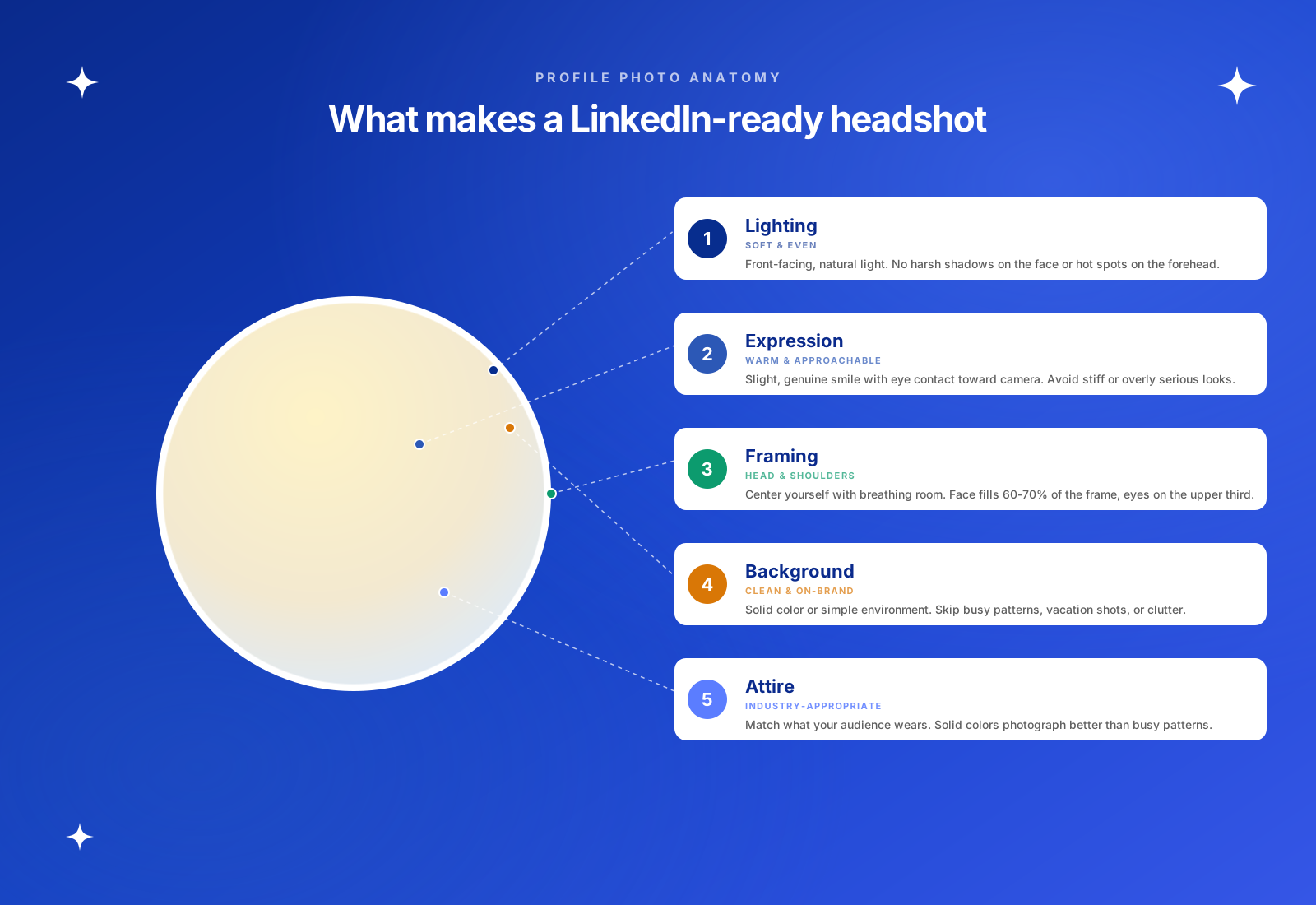
- Framing: Your face should fill about 60% of the frame, focusing on a head-and-shoulders crop.
- Expression: Research consistently shows that LinkedIn values approachability; a slight, natural smile usually performs best.
Once you have the perfect photo, it is worth looking at how it fits into your overall presence. You can find more strategies for building your brand in this guide on how AI can help you grow on LinkedIn.
The era of the $200 corporate photo shoot is over. You can now quickly generate a studio-quality professional portrait by simply using a smartphone selfie combined with the appropriate AI technology. This innovation eliminates the traditional expenses and discomfort of posing, giving you complete, precise control over your professional appearance.
However, a great headshot is just the beginning of your personal brand. To truly capitalize on your new professional look, you need to maintain a consistent presence.
Start using Taplio to automate your content and turn your optimized profile into a powerful lead-generation machine.
FAQ
Are AI headshots allowed on LinkedIn?
Yes, LinkedIn has no policy against AI-generated images. The platform's priority is that your photo accurately represents who you are and meets their professional community standards. As long as the final image doesn't look like a cartoon or a completely different person, it is a perfectly acceptable way to maintain a polished presence
Do free AI headshot generators actually look good?
They can, but they usually require a lot more work on your part. You'll likely spend more time fighting with prompts and regenerating images to avoid that "uncanny valley" look where things just feel slightly off. If you have the patience to experiment with different settings, you can get a solid result, but premium tools are much more "set it and forget it" because they do the heavy lifting for you
How can I make my AI headshot look less fake?
The secret is starting with a source photo that has natural, soft lighting. You want to avoid anything with harsh flashes, deep shadows, or heavy filters. It is recommended to use tools that edit your existing photo, like swapping a background or cleaning up your attire, rather than creating a completely synthetic person from scratch. This is the best way to keep your bone structure and features 100% authentic so you still look like yourself in person
Who owns the rights to my AI-generated photos?
This depends entirely on the tool's terms of service. Most premium generators grant you full commercial ownership once you pay for the service, but some free tools might retain rights to the images to train their models or use them for their own marketing. Doing a quick check of the fine print before you upload your face to any new platform to ensure you maintain control over your likeness
How long does it take to get an AI headshot?
It depends on the complexity of the tool you choose. If you use a simple LLM or a design tool like Canva, the results are practically instant. However, for high-end premium generators that actually train a specific AI model on your unique facial features, expect to wait anywhere from 30 to 60 minutes. That extra time is usually worth it for the massive jump in realism.


Keep reading
All articlesRelated Articles
.avif)
Your Linkedin AI coach is waiting for you
Join 12,000+ creators who let their coach turn the blank page into a plan and watch their audience compound.
7-day free trial · 30 day money back · Cancel anytime
AVG. VIEWS
2,979
-1.5%
ENGAGEMENT
3.2%
+0.8%
Free Monthly Report
How does your LinkedIn compare?
Get free monthly benchmarks on reach, engagement, and content format performance.
Get the Benchmark